 By Mod Ed
Calling all citizens of Levla, it is time for another Patch!
Yep, already, it's only been 11 days since Patch 23, and here we are again with a huge patch for Levla, turns out I might have trouble disconnecting from Levla, more on that below!
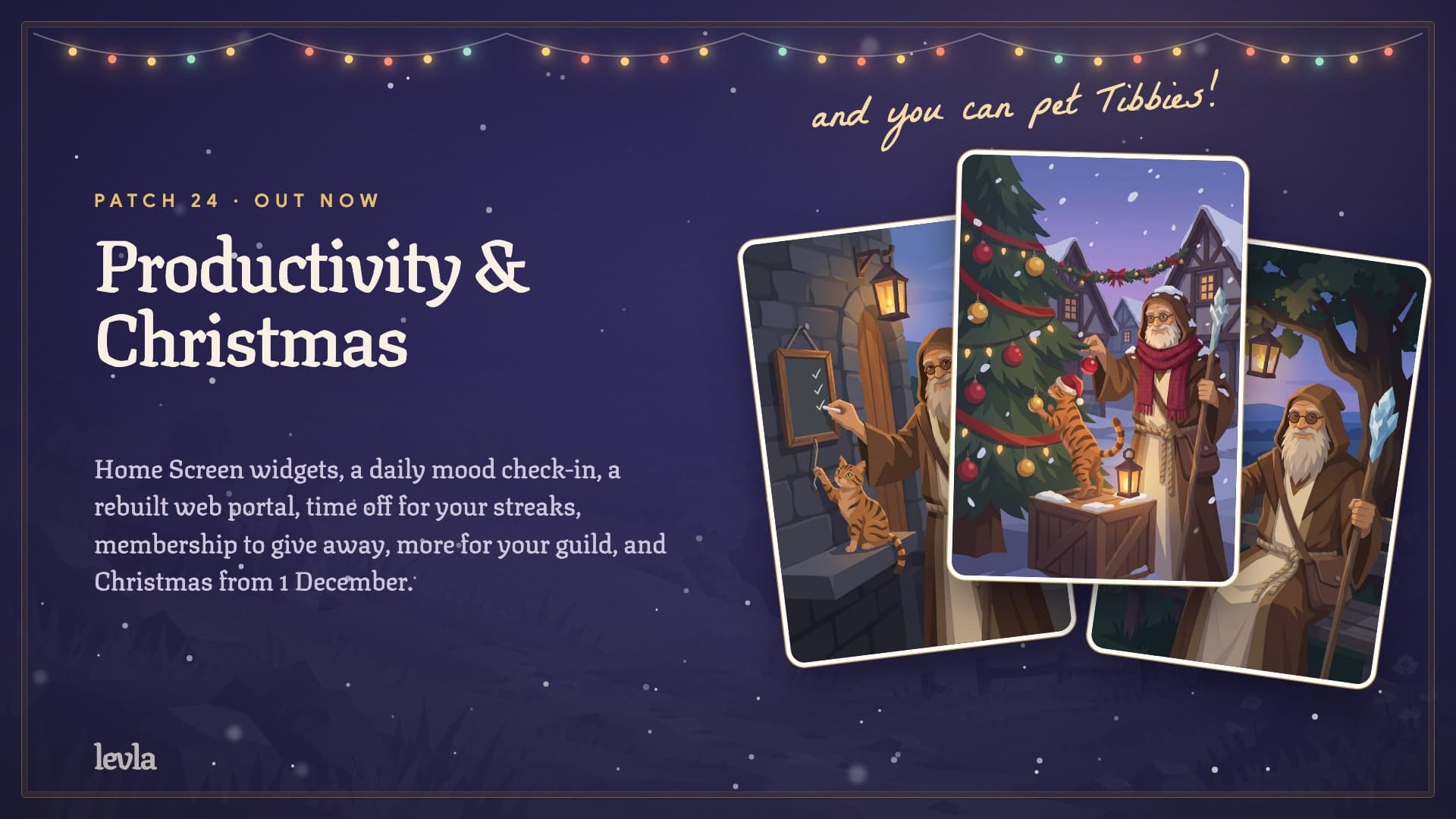
Patch 24 is the productivity patch, and it's all about your habits. Levla now lives on your Home Screen with widgets, there's a daily mood check-in (with a little surprise!), you can pause your streaks when you go away, and you can give membership to a friend. A LOT of this patch comes straight from your suggestions in Discord, so keep them coming!
Your guilds got plenty of love too, with a storehouse to share items in, polls, and a chat you can read in your own language.
And then there's Christmas! Last time I wouldn't tell you what was being set up in Witsend's square. This time I'm telling you everything, because I can't keep it in any longer, and it will give you something to look forward to, it goes live in ~7 days!
It's another long one, so grab a coffee (or a hot cocoa, more on that below).
With that said, let's get into what's new in Levla. But first, a quick note!
Pre-note
Update on the app stores!
As usual with full releases, you're going to need to update your app on either the App Store or the Play Store, depending on what platform you're on.
Everything in today's patch needs the new version (1.1.1), so without updating you won't see the widgets, the mood check-in or any of the Christmas goodies!
And if you're enjoying Levla, a review on the store is a huge help to our growth. Thank you <3
I'm now on a tiny break
I feel increasingly tired recently, it has been an insanely intensive year, for those who joined recently and has seen the pace at which we push updates here at Levla, well it's been like this since February, non-stop, turns out I might have isues disconnecting, and I intended on building Levla for a loooong time, so a break here is what's needed I think!
So, with that said, I will be taking some time to recharge, you'll still see me in discord of course, and I will be fiddling with some side-projects (Levla Related), but there will be a bit until the next update, but there is plenty of content rolling out on the 1st of December!
The next update is also a big one, I expect it to be one of the biggest and most exciting updates to Levla if you're here for the game world, lore and progression, as it is big content patch.
A special thank you
A huge thank you to my team of testers, who have had four test builds in one week thrown at them and still found the time to tell me what was broken. You're the best!
Just like last time, you'll see a name next to many of the bug fixes further down. Those are the Levlans who reported them in Discord, and they're the reason those bugs got fixed.
And to all of you using and supporting Levla, both F2P users and members: thank you. Reading what you're up to in your guilds every day is the best part of my job.
Much love! <3
Upcoming Roadmap
With the productivity patch out, the next big one is all about content:
Patch 25 - Major Content Update
- Combat Rework
- Potion Rework
- Magic Combat
- At least 2 new locations, hopefully 3
- 10+ new quests & lore
- Much more crafting in all skills
- Reworked homestead
- Reworked Game UIs
Other Planned Changes
- New Web Portal for Habits & Todos
- Other Community Events
- Guardian System
- Refreshed animations and adventure look
- OFC much more cosmetics and cool stuff
Christmas in Levla!
On December 1st, it's beginning to look a lot like christmas in Levla, and with the success of the halloween event, I really wanted to one-up it in every way.
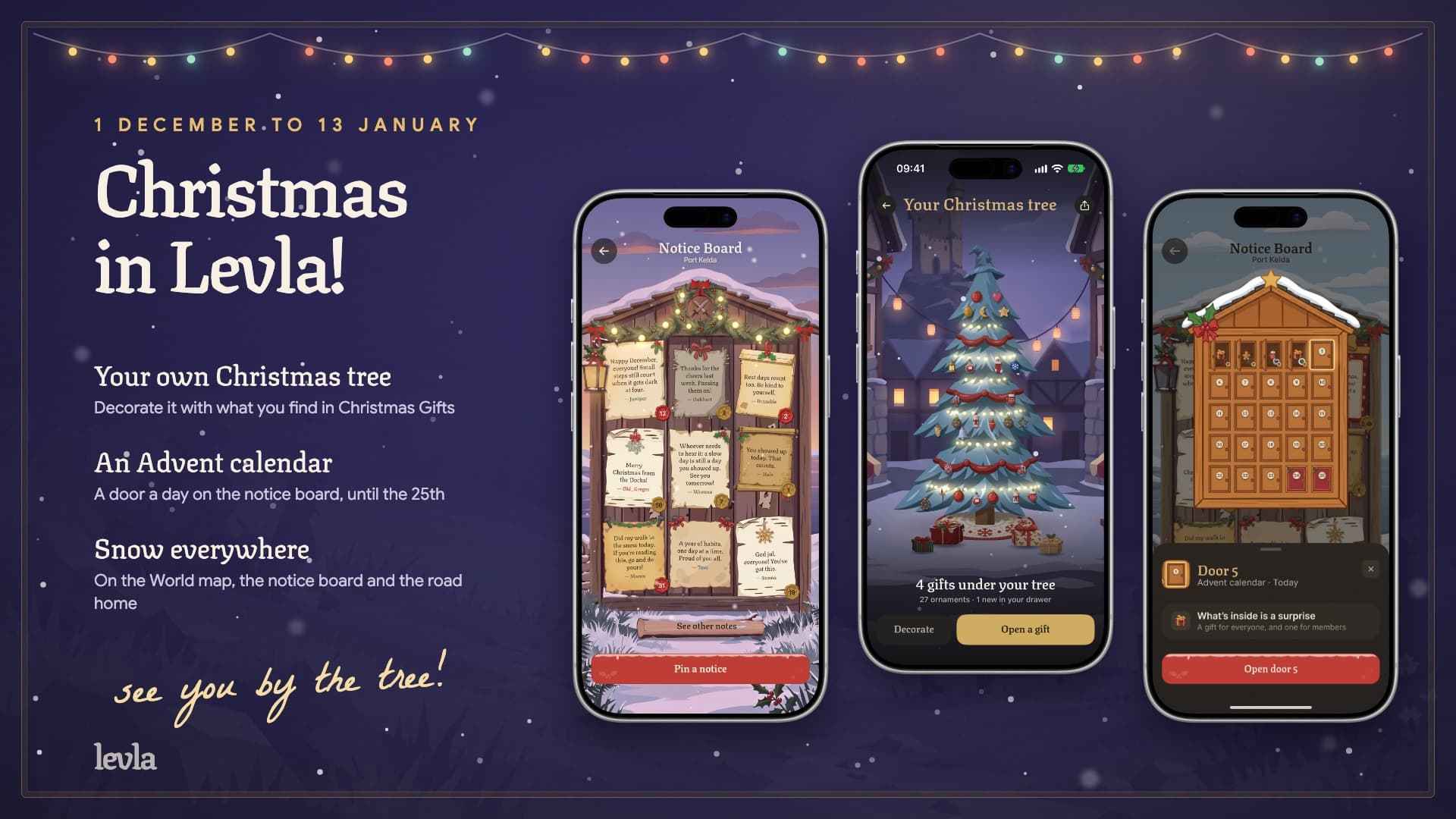
On top of all the cosmetics & pets, you will also be able to decorate your very own tree, there are hundreds of ornaments, toppers, lights and tree types to collect, and I can't wait to see what you all make.
Christmas in Levla runs from 1 December to 13 January, and there's a lot more to it than the tree.
Your own Christmas tree
You'll find your tree in Witsend's square on the World map.
- Decorate it your way: pick the tree itself, a topper, lights, a garland and a skirt, and hang ornaments wherever you like
- Christmas Gifts: decorations come out of Christmas Gifts, which you find while completing your habits and todos
- Open them by the tree: your gifts wait under your tree, and what you find can go straight onto it
- Trade your doubles: most decorations can be sold and bought on the Trading Post
- Show it off: share a picture of your tree when you're happy with it
Now and then a gift also holds a Hot Cocoa or a Peppermint Stick. I'll let you find out what they do! (Also, ofc cosmetics for your character)
The Advent calendar
On 1 December, an Advent calendar opens on Port Kelda's notice board.
- There's a door to open every day until the 25th
- Behind each door there are two gifts: one for everyone, and one for members
- A new door opens at midnight on your own clock, wherever you live
- Missed a day? You can still open its door afterwards
So for every day leading up til Christmas there is something new to collect!
Three Christmas quests
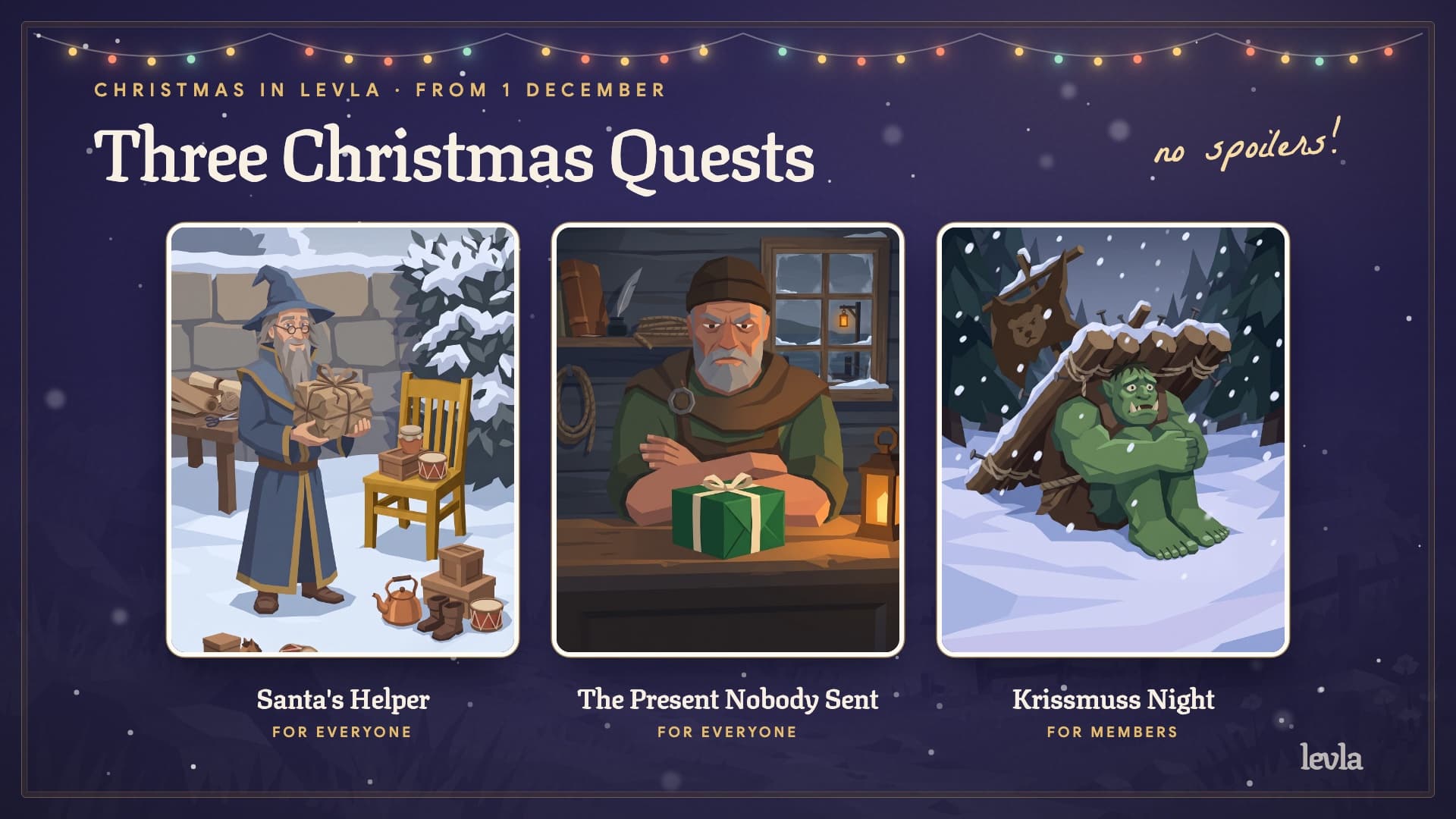
- Santa's Helper (for everyone): Santa hasn't been to Witsend for years, and Tobbekarl wants to change that. Its last part opens on the real Christmas Eve, so you can't finish this one early!
- The Present Nobody Sent (for everyone): there's a present on Torvid's counter in Port Kelda with no name on it, and the whole dock has a guess. You can start it on your very first day in Levla
- Krissmuss Night (for members): O'Gleeb has heard about something called "Krissmuss", and he wants one
Between them there are titles, decorations you can't get anywhere else and plenty of Christmas Gifts to earn. I won't spoil the stories. I'm really proud of these three!
A song nobody asked for
There's a new random event this Christmas. If you hear a man warming up his voice somewhere close by, go and have a look!
Christmas for your guild
- Two Christmas expeditions, one of them of a brand new kind: Sing. They show up as "coming soon" from mid-November and can be picked through the season
- More than 30 Christmas challenges, in tiers. Finish one tier to open the next. The first tier of each gives your guild a Christmas piece for its banner, like Holly, a Bell or the Icicles shape
- The hall's wall is dressed for Christmas
And the rest of the world
- Port Kelda's notice board gets a winter look
- Now and then, we'll pin a wrapped notice to the board ourselves. Cheer it, and there's a gift in it for you!
- The Christmas theme and the snowman app icon from Patch 23 are still there, under Theme and App Icon
One more thing about Halloween: if you started A Murder in Witsend in time but got stuck on Harvest Night, that's fixed, and you can finish the quest now.
Levla on Your Home Screen
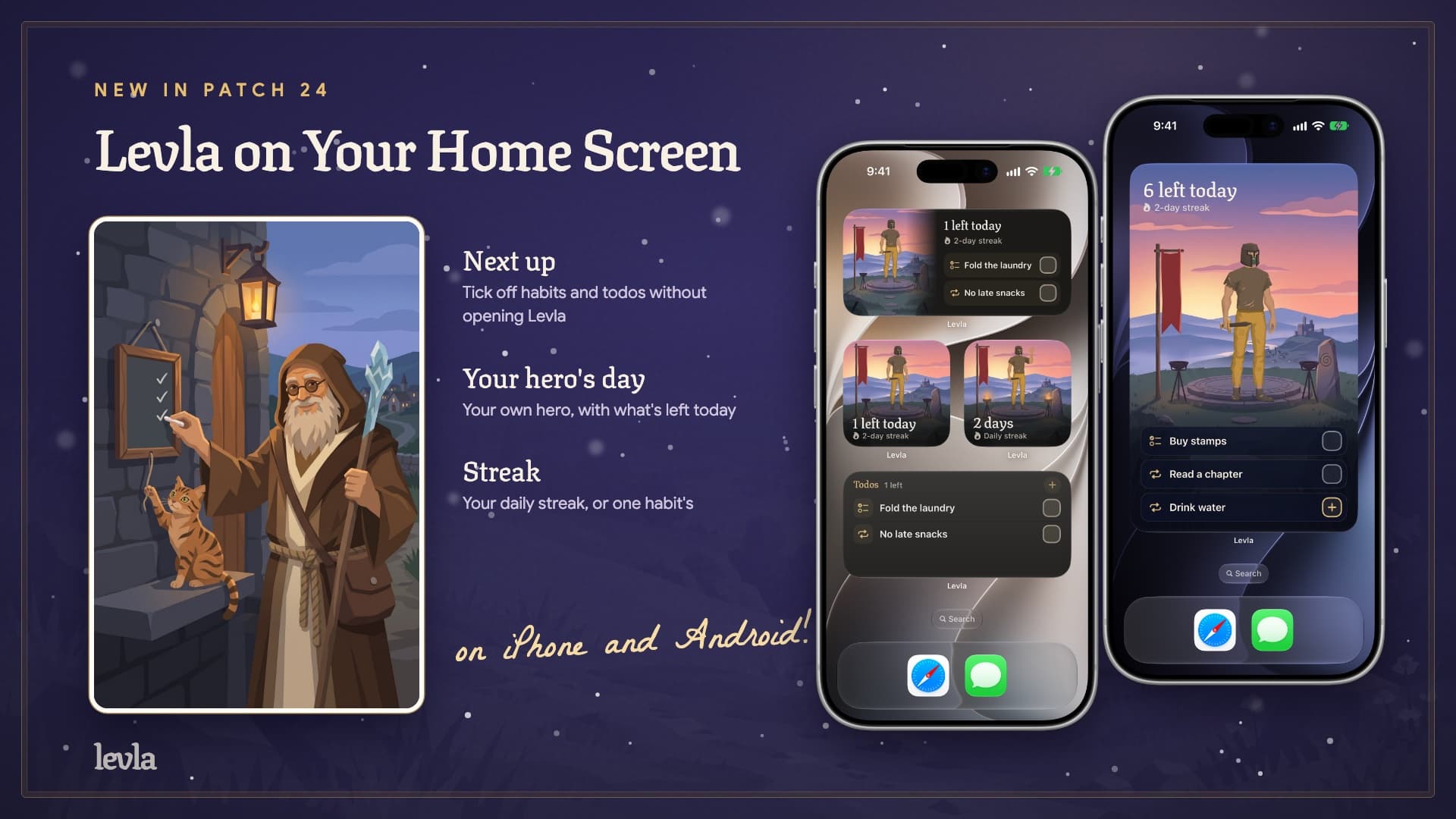
The most requested productivity feature of them all is here: widgets! You can now see your day and tick things off without even opening Levla, on both iPhone and Android.
Three widgets
- Next up: your next habits and todos for today. Tap a box to tick it off right there, without opening Levla
- Your hero's day: your own hero on the hilltop, in the real time of day, with how many things you have left. When your hero is out on an adventure, the widget shows where they are and when they're back
- Streak: your daily streak, one habit's streak or your reflection streak. You choose which
Next up has a setting for what it shows: habits and todos, only habits, only todos, the groups and lists you pick, or only what you've pinned. To change it, hold the widget and edit it.
To add a widget, hold an empty spot on your Home Screen and look for Levla in the widget list.
On iPhone
- Lock Screen: Next up and your streak have Lock Screen widgets too. Names of habits and todos are hidden while your phone is locked
- Control Center and the Action button: new controls to tick a habit, add a todo, see your day, check on your adventure or start a habit's timer
- Siri: say "Levla" and ask to tick off a habit or todo, or to hear what's left today. On iOS 27, Siri can also create, change and delete todos
- Live Activity: the adventure on your Lock Screen and in the Dynamic Island has been redrawn, with your hero in the gear they're wearing
On Android
- Quick Settings tiles: swipe down from the top of your screen to tick off a habit, add a todo, check on your adventure or see how your day is going
- Live Updates: on Android 16, a running adventure shows in your status bar with the time left
How Was Your Day?
Mood tracking is here, and I hope it's the calmest corner of Levla.
Each evening, the top of Home and the Journal ask you one question: "How was your day?" Tap one of five faces, and that's all you need to do, super low-effort with a high pay off :)
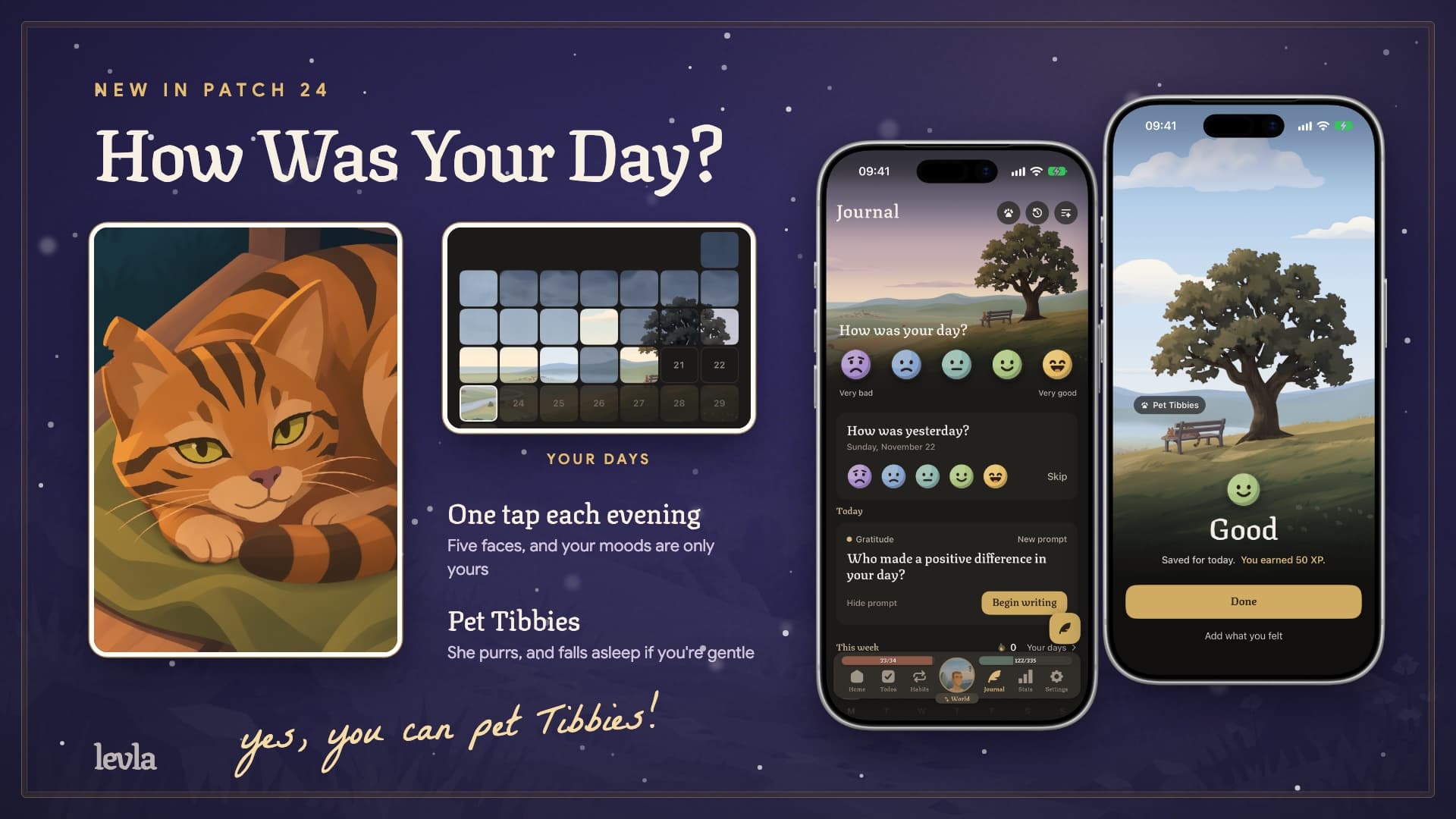
The check-in
- Pick a face, from Very bad to Very good, and you earn a little XP for checking in
- If you like, add what you felt (like Calm, Proud, Tired or Stressed) and what affected your day, or write about it in your Journal
- Forgot yesterday? You can still fill it in today
- The first time, Levla asks three short questions: where to keep your moods, whether you want to see how many others had a bad day too, and whether you want a reminder in the evening
The hill
Your check-in happens on a painted hill, with a bench under a tree where Tibbies sits. The sky follows your day. On a bad day it rains, and Bob comes to sit beside her and keep the bench dry. You can swipe the rain away with your finger, too.
Looking back
- Your days shows your month as dots, one for each day, in the colour of that day's mood
- Your year shows the whole year on one page
- Tap a day to see what you did on it
- After enough days, Levla looks for links between your habits and your mood, like a habit that goes with better days, this requires membership, as it is very resource heavy on our end!
On a bad day
- If you said yes to it, a bad day shows how many other players had one too, and you can send each other a hug. No names are shown, ever
- Talk to someone lists real helplines for your country that you can call, text or chat with
- If most of your last two weeks were bad, Levla says so and offers to show you those helplines
Your moods are yours
- Other players can never see your moods
- You choose where they're kept: on your account, or only on your phone
- You can export or delete all of them in Settings
Note: The mood check-in is for your own reflection. It is not a medical tool, and nobody at Levla reads your Journal.
Pet Tibbies
And now the most important feature of the whole patch: you can pet tibbies.
After you rate your day, tap Pet Tibbies next to the bench. Or tap the paw at the top of the Journal, any day you like.
It's just for fun. Nothing is saved, and there's nothing to earn. I hope it helps on the bad or stressful days <3
The Journal
Reflections has grown into the Journal, with the mood hill at its top.
- NEWThe Archive shows every entry you've written, leads with your own words, and can be searched
- NEWA reflection written without a question can have a title
- BETTERWriting happens on a page of its own, and you can choose another prompt right there
- CHANGEWeek in Review is gone. Your Stats count your moods now
- CHANGEAfter your day's first entry, more entries earn XP up to four times a day
Time Off
Going on holiday? Having a rough day? Your streaks no longer have to pay for it. Both of these live on the new Time off page, just above Settings in your profile menu.
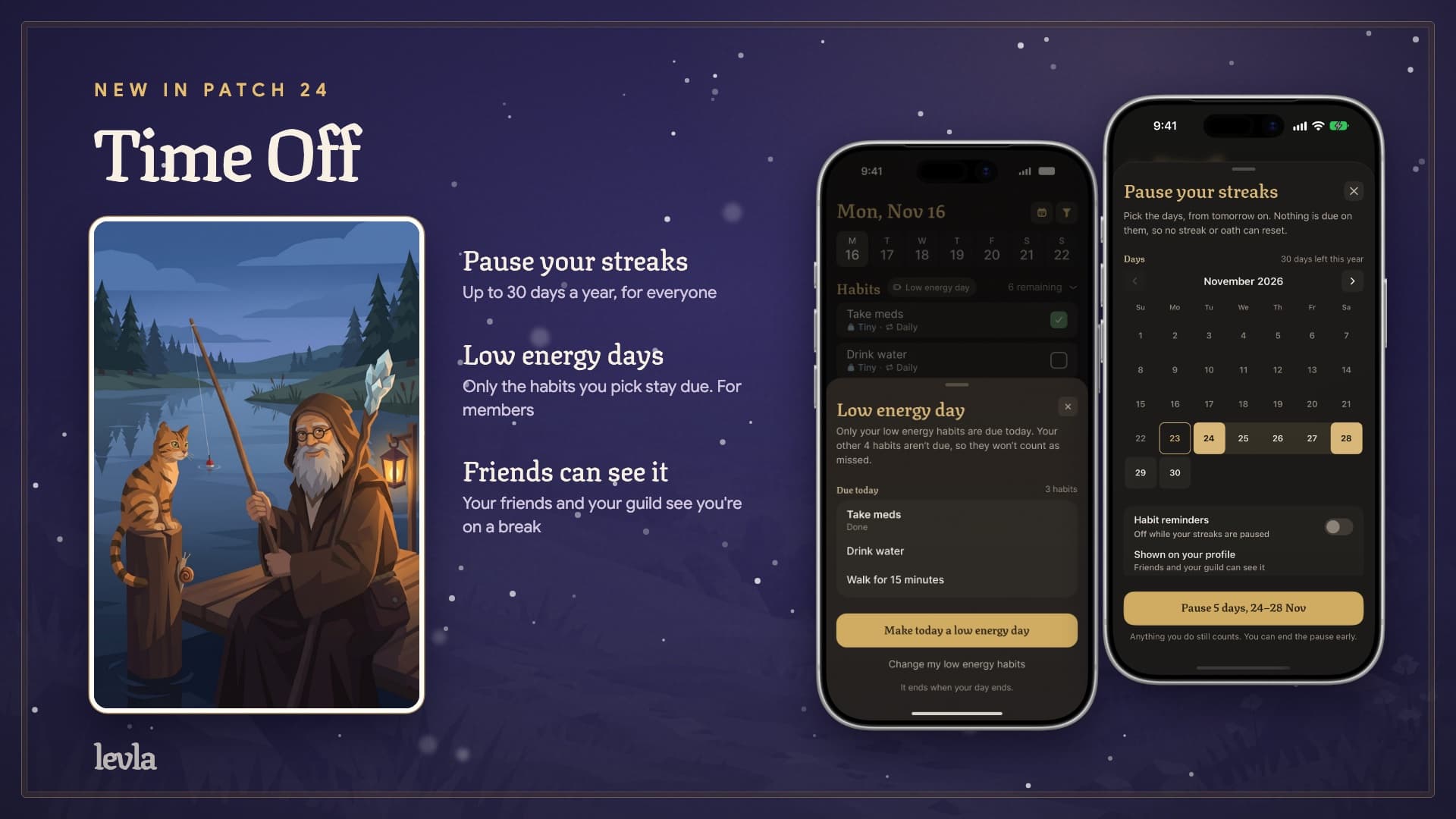
Pause your streaks
For everyone, up to 30 days a year.
- Pick the days on a calendar, from tomorrow on
- Nothing is due on a paused day, so no streak and no oath can reset
- Anything you do on a paused day still counts
- Habit reminders are off while you're paused, unless you choose to keep them
- Your friends, your oath partners and your guild can see that you're on a break
- Back early? End the pause, and you get back the days you didn't use
Low energy days
For members. Some days you can only do a little, and that's fine.
- Pick the habits that stay due on a low energy day
- On a day like that, tap the snail next to the date on Home
- Your other habits take the day off and won't count as missed
- Habits you've sworn an oath on, and your guild's habit of the month, always stay due
- It ends by itself when your day ends, and you can go back to a normal day whenever you like
Don't want the snail on Home? You can hide it on the Time off page.
Levla in Your Browser
If you didn't know, Levla has had a web portal for quite some time, but it was a very low-effort, rushed product, so with this update, I also gave it a complete overhaul.
If you'd rather plan your day on a big screen with a real keyboard, open todos.levla.app in your browser and sign in with your Levla account. You'll also find it as Web Version in your profile menu.
The old portal fell behind the app a long time ago, and some of you told me you stopped using it because of that. Sorry about that! The new one follows the app.
Note: This is only for managing your to-dos and habits, it's for when you need to access the productivity side of Levla, there are no game elements (yet).
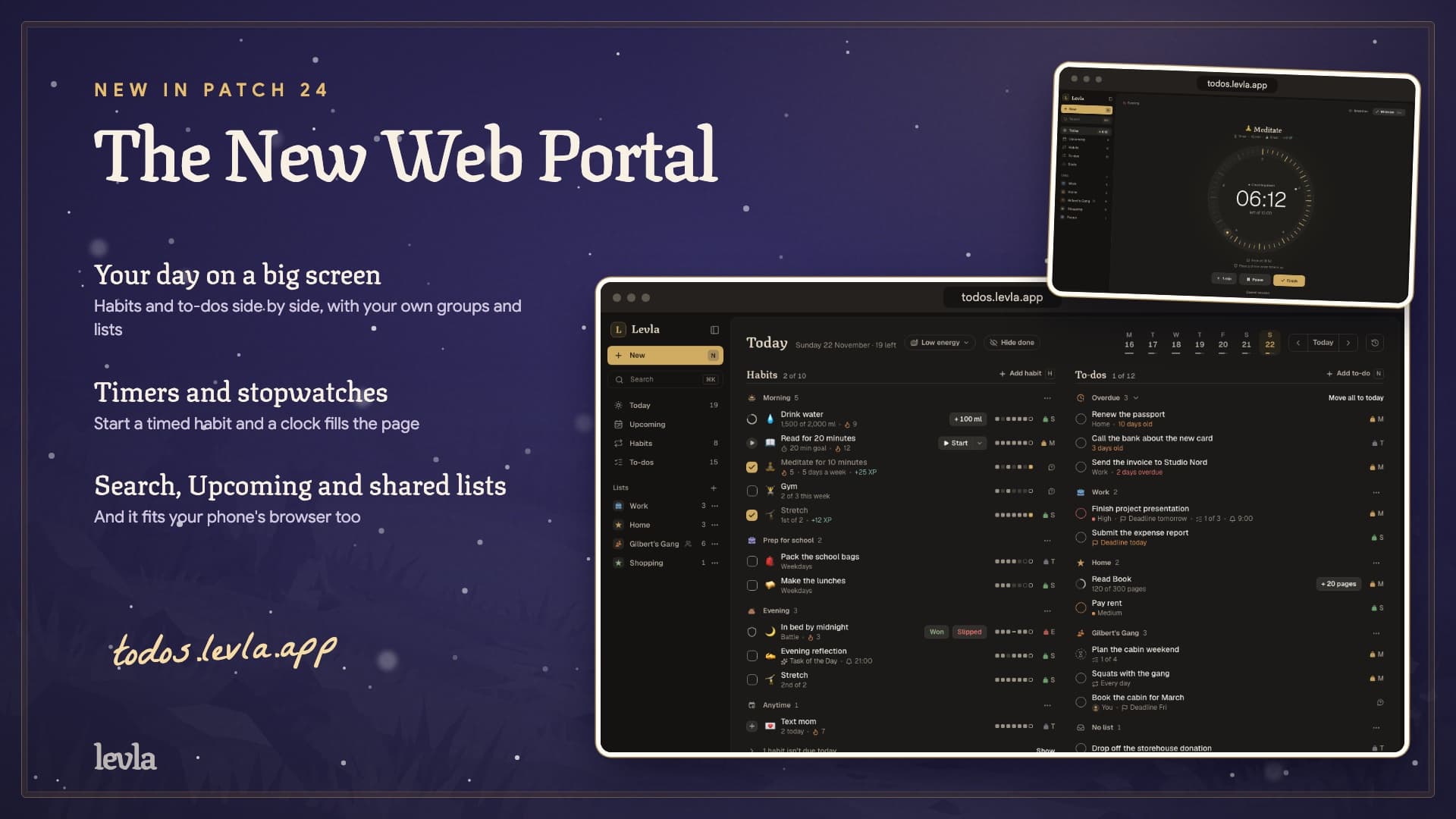
- Today: your habits under your own groups and your to-dos by list, side by side, with your pins and your low energy day
- Everything a row can do: check off, count up and log time, right from the list
- Timers and stopwatches: start a timed habit and a clock fills the page, so you can focus on that one thing
- A create bar: press N for a new to-do or H for a new habit. Every option is there to click, and typed shortcuts work too if you like to go fast
- A details panel: click any habit or to-do to edit it, with its steps and its history
- Upcoming: the week ahead in seven columns. Drag a to-do to another day to move it
- Search: Cmd+K (or Ctrl+K) finds your habits and to-dos from anywhere
- Shared lists: see who has what, and take a to-do or give it to someone
- Your way: Larger text, a 12 or 24-hour clock and the day your week starts on, all in Settings
- On your phone too: the same portal fits a phone's browser
It's brand new, so if something looks off, tell me in Discord!
Things You Asked For
All of these come straight from your suggestions in Discord, thank you so much for all the amazing suggestions that makes Levla better for everyone <3
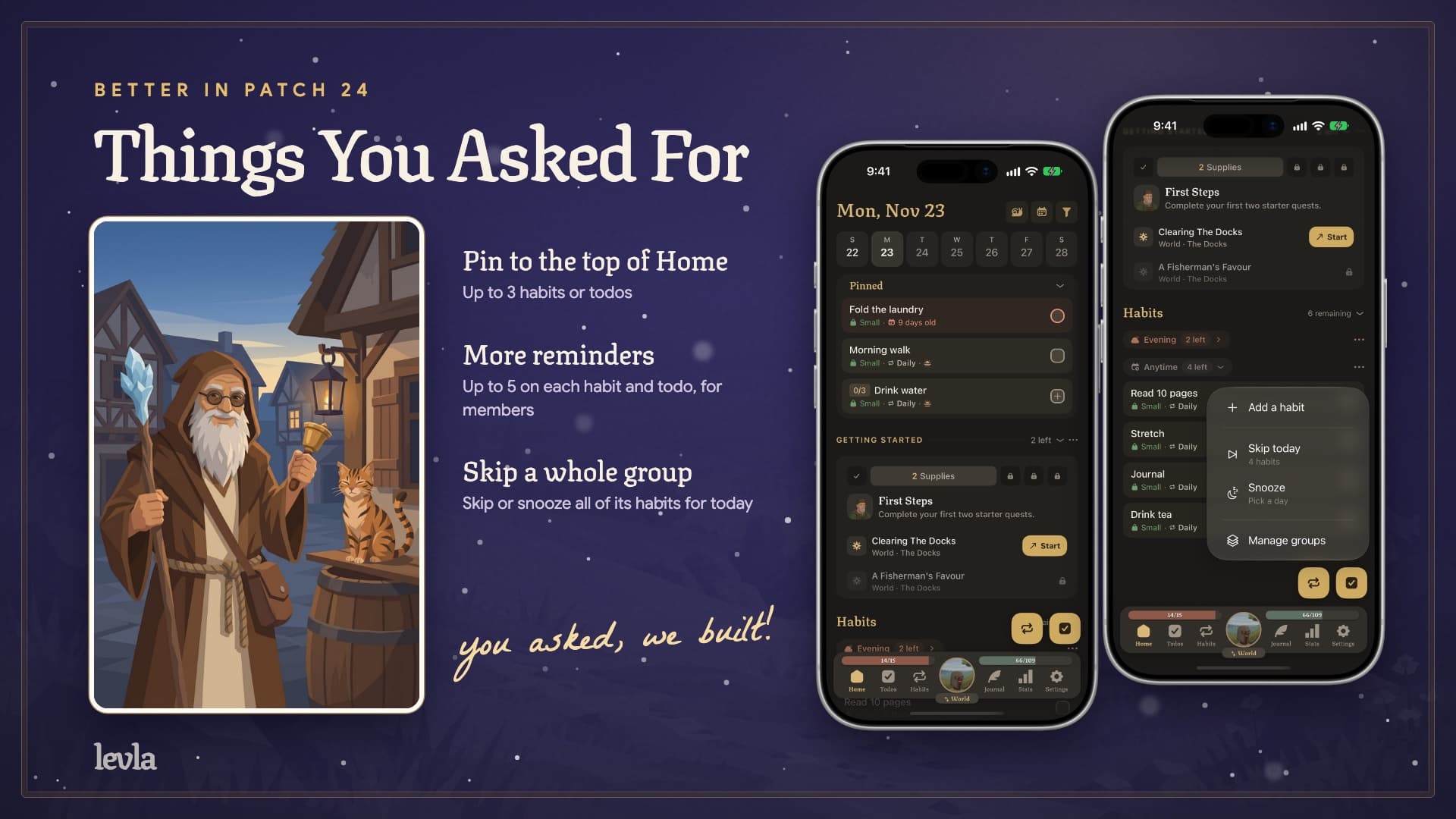
- NEWPin to the top of Home: keep up to 3 habits or todos in a Pinned box at the top of Home. Pick "Pin to top of Home" in a habit's or todo's menu
- NEWMore reminders: a reminder is now a list of times, and members can set up to 5 on each habit and todo
- NEWSkip or snooze a whole group: tap the "…" on a habit group (or hold its heading) to skip or snooze all of its habits for today
- NEWPause the adventure queue: a new switch above the queue lets your current adventure finish while the next one waits
- NEWExtra ticks on a weekly goal: once you've met a habit's goal for the week, you can keep ticking it for half XP
- NEWSeveral oaths with one friend: you can now swear more than one oath with the same friend, each on its own habits
- NEWNotes on players: keep a private note about any player, like how you know them. Only you can see it
- NEWHow long a fight takes: when you set up a fight, the bottom of the sheet says how long the fights you picked will take
- NEWLanguage in Settings: change the app's language without signing out
- BETTERArrange habits by group: the Arrange page lists your groups, and each group opens a page of its own where you put its habits in order
- BETTERThe Morning, Afternoon, Evening and Night groups can have an icon you pick
- CHANGENew habits and todos start on "Ask me each time" for effort, since some days are harder than others
More For Your Guild
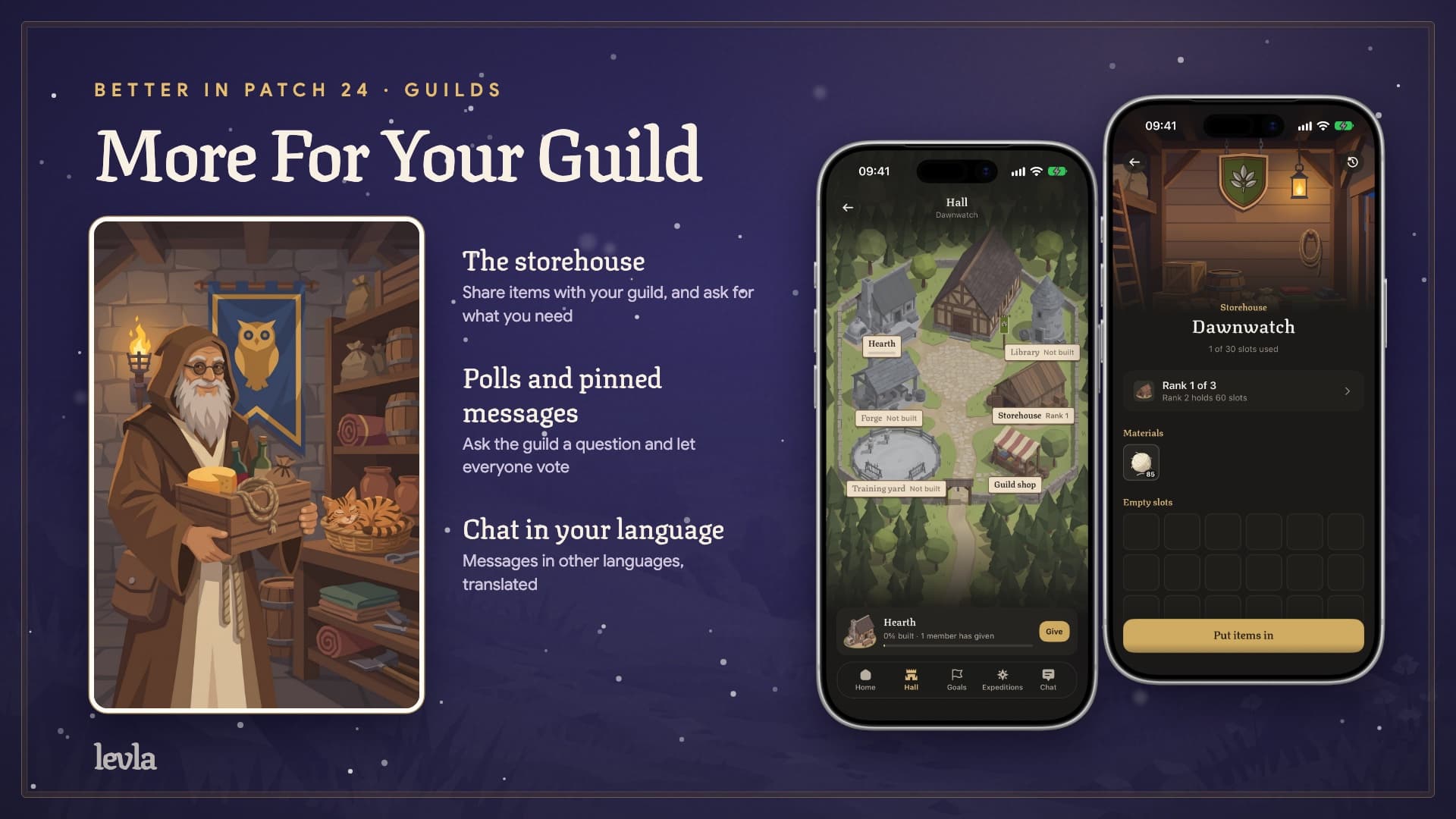
Guilds have been out for eleven days, and you've already founded more than a hundred of them! Guild leaders have sent me a looong list of things they'd like, and a good chunk of it is in this patch.
Note: A new guild now starts with 40 seats instead of 30, and every guild already founded got the extra seats too.
The storehouse
The Storehouse station now has a page of its own, where your guild shares items.
- Any member can put items in, like materials for the hall, food or gear they don't use anymore
- Need something? Ask for it, and the leader or an officer answers
- Every move is written in a log that the whole guild can read
- A higher Storehouse rank gives more slots, and gear that is exactly the same shares one slot
Guild chat
- NEWPolls: any member can ask the guild a question with 2 to 5 answers. Nobody can see who voted for what
- NEWRead chat in your language: messages written in another language can be translated to your phone's language. You choose if that happens by itself, with a tap, or never
- NEWPinned messages: the leader and officers can pin up to 3 messages or polls for everyone
- NEWA thumbs-up reaction, and all the reactions are now painted in Levla's own style
- BETTERA busy chat is now one notification that updates, instead of a long list. Replies and mentions still get their own
- BETTEROn iPhone, guild notifications show your guild's crest, or the face of whoever wrote
Habits and todos of the month
- NEWTodos of the month: the leader or an officer can set up to three one-off todos a month, next to the habits
- NEWBigger habit votes: a vote can have up to five habits, and whoever starts it picks how many of them win
- NEW"I already do this" on every guild habit: pick which of your own habits it is, even if yours has another name, and it counts for the guild too
- BETTERThe leader and officers can write a new habit straight into the guild's habits, and sort them into groups with their own colour
- CHANGEThe Challenges tab is now called Goals, and holds the month's habits and todos together with your challenges
Seats and joining
- NEWMore seats: members can chip in coins or essence to a seat pot, and when a pot is full the guild gets more seats. There's no longer a limit to how many seats a guild can have
- NEWA level to join: a guild can ask for a total level or a combat level before someone can join
- NEWRequests have their own page, with more about each person who's asking, and a way to say no to everyone at once
- NEWSay why: when the leader or an officer says no to a request or removes someone, they can pick a reason and add a note. Only that player reads it
- NEWVisit another guild to look at its hall and its members before you ask to join
For leaders and officers
- NEWSee when each member last opened Levla, and how they're doing with the guild's habits
- NEWNudge: send a friendly nudge to a member who hasn't opened Levla for a week
- BETTERIf the leader is away for a month, the guild now passes first to someone who has used Levla in the last two weeks
Expeditions, challenges and banners
- NEWWhile an expedition is running, you can look through all the other expeditions too
- NEWThe result of an expedition is laid out in cards: your reward, the loot, the guild's new emblem and who helped the most
- NEWChallenges can now count items used, boxes opened and decorations hung
- NEWBanners got eight plain shapes, four new patterns, black, and the choice of no emblem at all
- BETTERThe Guild tab shows your own guild's crest
- BETTERThe Hall's buildings have name plates with their rank, and a tap on the built Storehouse or Library opens its page
- BETTERA station that has to wait its turn now offers to give to the one your guild is building
- BETTERThe Library station's ranks say plainly what they unlock
- CHANGEA trim kit in the guild shop can be bought again, since putting it on a piece of armour uses it up
Give Membership
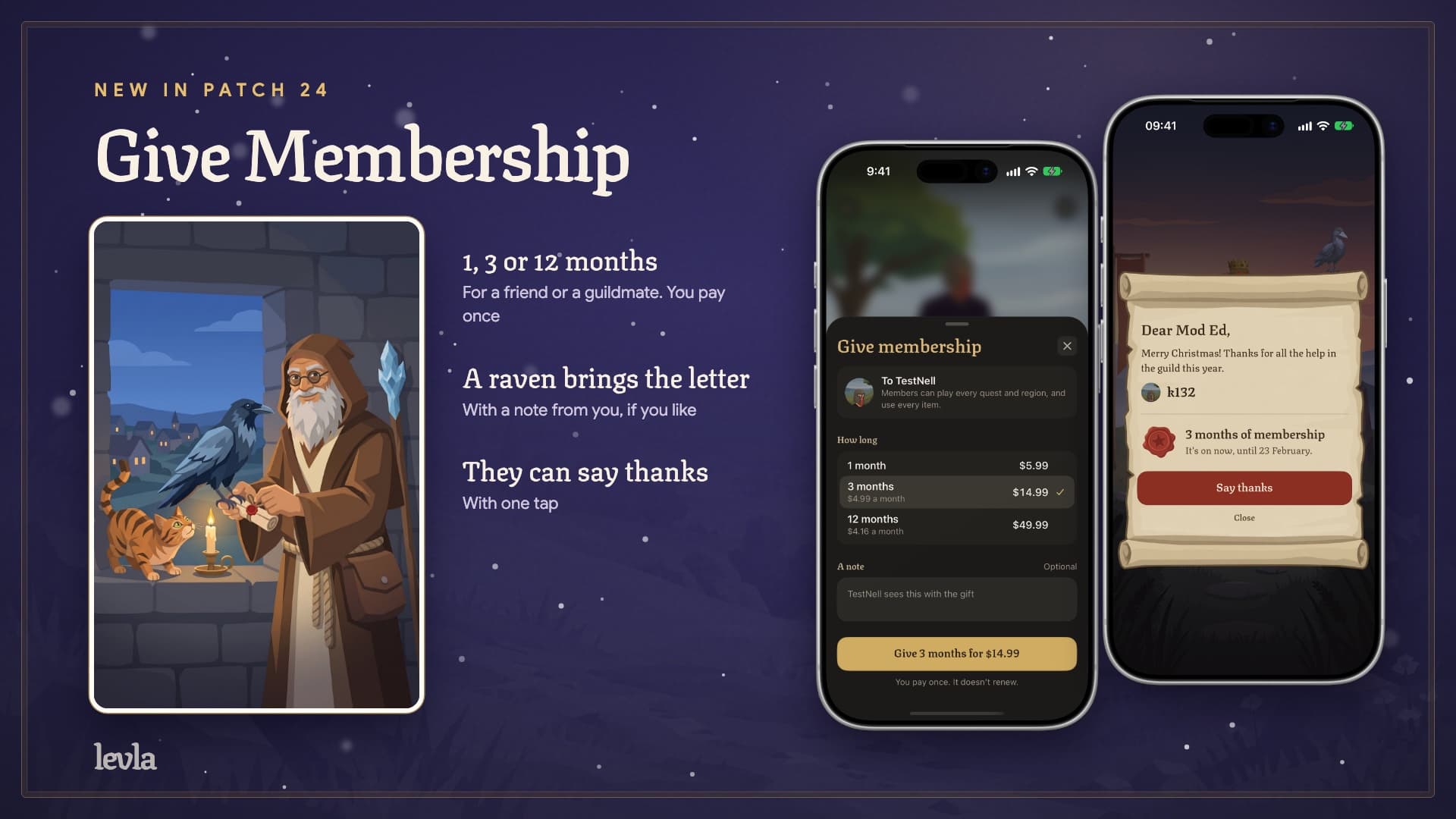
Want to treat a friend? You can now give another player 1, 3 or 12 months of membership!
- You'll find Give membership on a player's profile, in your friends list, in your guild's member list and on someone's note on the notice board
- It's a one-time payment, and nothing renews
- A raven brings it to them as a letter, and they can say thanks with one tap
- It's only offered for players who aren't members already
Other Changes
Items & the Bank
- NEWProtect an item: a protected item can't be sold, traded, given away, dropped, melted or mynted by mistake. You can still use it. Find Protect in the item's "…" menu, or protect many at once in the Bank's select mode
- NEWOpen 5 and Open all: open a stack of boxes in one go, up to 100 at a time
- NEWThe Bank's sections fold from their headings, with a Collapse all button
- BETTERAn item's menu starts with Protect, Rename and the profile highlight. Mark for Mynt and Drop come last
- BETTERThe shop's Repair tab shows your gear's durability and repair costs while you're out adventuring
- BETTERThe repair sheet is a checklist, and names the tool you're missing right on the button
Adventures & Stamina
- NEWThe first time you don't have enough stamina to start an adventure, Levla explains where stamina comes from
- NEWA tap that would give you more stamina than your bar can hold asks first, and says how much would be lost
- BETTERWhen you claim an adventure, the list shows every item it gave you, and the walk home after a quest adventure shows them one at a time
- BETTERDrop chances show one decimal under 10, like "1 in 6.7", the same way the wiki does
The World Map
- BETTERZooming and dragging are smoother, mostly on slower phones
- BETTERThere are new clouds along the edges of the map
- BETTERJezkal Mountain and the Forgotten Pass play their own music when you move over them
- BETTERAn adventure's pin opens the adventure's own sheet, and every adventure pin has the same gold ring
- CHANGEThe floating isle, the troll lands and the western meadows now say "Coming in Patch 25"
Quests & Conversations
- NEWThe step you're on has a short line of story under its title
- NEWA step shows the items it asks for, with a red or green badge for how many you have. Tap one to open it
- NEWA step that opens later says when, and a quest outside its dates shows the date instead of a Start button
- NEWA reply in a conversation can open an adventure's sheet for you
- BETTERConversations with O'Gleeb and Duggan play their area's music, quietly
- BETTERPaying someone in a conversation shows "You paid" with their face, instead of a warning
The Notice Board & the Library
- NEWTap a note twice to cheer it, and take a cheer back with Undo
- NEWYou can see who cheered your note, and you get a notification when your note comes down
- BETTERNotes you've cheered have a red wax stamp, and the board shows them after the rest
- BETTERYou can cheer up to 40 players a day in the reading room
Everything else
- BETTERLevla opens faster, and swiping between days on Home is a lot smoother
- BETTEROn Android, every "…" menu and every hold opens the same new menu
- BETTERHome's cards show a habit's next reminder time today
- BETTERThe profile menu has been tidied up: What's New and Join Discord moved up, and the wiki is under Knowledge base
- BETTERWhat's New has a new tour of this patch, with nine new paintings
Bug Fixes
Habits, Todos & Journal
- FIXEDTodos on a shared list can be changed from your own websites and tools again (Credit: @momenslythe)
- FIXEDOn Android, typing a step under a todo near the bottom of Home no longer hides the field behind the keyboard (Credit: @remz129)
- FIXEDTwo ticks made at almost the same moment no longer lose one tick's stamina and XP
- FIXEDThe day a todo was finished is now your own day, wherever you live
- FIXEDMaking a todo says "Todo created!" once, and its Undo works straight away
- FIXEDA journal entry that earned nothing no longer says "You still earned XP"
- FIXEDOn iPhone, pull to refresh needs a full pull again, instead of going off on a small scroll
- FIXEDThe Library's Habits tab opens quickly again, however many habits it lists
Adventures, Skills & Bounties
- FIXEDA finished Notice Board request can always be handed in. Before, a quest reminder, like Grumdar's during Nothing Wasted, hid the "I've done what you asked" reply (Credit: @cjdxn)
- FIXEDThe time left on every farming patch stays full size, instead of shrinking to tiny text (Credit: @a.b.dance)
- FIXEDTapping the Dynamic Island during a focus session opens the session, where you can pause or stop it, instead of a page with no way out (Credit: @brgqst)
- FIXEDThe side menu shows the same total level as the Skills tab. It was counting an old skill that's no longer in the game (Credit: @aressindal)
- FIXEDStarting a quest step from the World map no longer crashes the app on Android. The map stays open, as it does for gathering and fights (Credit: @angry.makaron)
- FIXEDIn conversations, an item's icon sits in its own space just before the item's name, instead of on top of other words (Credit: @capitan_scythe)
- FIXEDDrop chances in the app now match the wiki. A chance like 1 in 6.7 used to show as 1 in 7 on a creature's page (Credit: @varmint_cat)
- FIXEDTapping "Empty slot" in the Adventure Queue always opens the World map, where you can pick an adventure to add
- FIXED"Ask something else" in a conversation opens on the right line when the quest moved on while you were talking
- FIXEDStarting an adventure and claiming a fight or a dungeon are quicker for players with a long history
Quests
- FIXEDIf you started the Halloween quest "A Murder in Witsend" in time, you can start Harvest Night and finish the quest, and Tobbekarl moves on to Mynt Condition after it (Credit: @_ambanana_)
Items, Crafting & Trading Post
- FIXEDScarves, hats and other worn items with no stats say "Equip" instead of "Wield". Wield is only for weapons and tools (Credit: @chickennick9)
- FIXEDThe "How to get it" list scrolls all the way down, and its last row is no longer hidden behind the Android buttons (Credit: @e2thepi)
- FIXEDSorting the bank by rarity puts crafted rings, amulets and gear under the quality their tile shows, like Pristine or Masterwork, instead of under Common (Credit: @jaller_obrim)
- FIXEDWhen a dish burns while cooking, the game says it burnt and that the ingredients are used up, instead of only "Crafting failed! Better luck next time." (Credit: @st3v13summ3rs)
- FIXEDMarking only some copies of an item for Mynt now asks first, and can protect the copies you didn't pick, so Grandmynt doesn't take them (Credit: @dalish2337)
- FIXEDA Bird Nest with nothing in it no longer flashes and closes. It opens on your taps and says "You found nothing" (Credit: @nyank0the99th, @lost_angel.000, @vimo)
- FIXEDIf you're not a member, Mynt now skips your members items instead of refusing the whole spell
- FIXEDPicking gear from a stack in the set editor no longer saves the set again and again
- FIXEDThe Sawmill's log picker leaves out logs saved in a loadout, and crafting or repairing with a copy saved in a loadout now says so instead of failing
- FIXEDPulling down a Trades list refreshes it
Guilds
- FIXEDHabits you do on the evening an expedition or a hall building starts, or the evening you join a guild, now count wherever you live. Before, players behind UTC lost that evening's habits (Credit: @avra.kedabra, @watercolourghosts)
- FIXEDAfter you stop doing a guild habit, its page on the guild home offers "Add to my habits" again (Credit: @mashtime)
- FIXEDIn light mode, the guild's bottom bar is as easy to read as the main tab bar (Credit: @summitwanderer)
- FIXEDGuild hall buildings that finish at the same time now come as one notification that names them all, instead of two that look the same (Credit: @jedimastrbob)
- FIXEDOn Android, the app no longer closes right after you join a guild
- FIXEDGiving to a hall station that many members have given to no longer fails to show up for the rest of the guild
- FIXEDAfter a new expedition is picked, you can still see how the last one ended
- FIXEDIn light mode, your guild's name reads clearly over the Hall's painting
Profile & UI
- FIXEDTapping a player's name or picture in the Reading room opens their profile (Credit: @jedimastrbob)
- FIXEDOn Android, the chosen side of the Live / Idle switch on your profile is rounded and stays inside the switch (Credit: @ver05234)
- FIXEDOn tablets and other wide screens, the whole notice board fits on screen, so every note can be read (Credit: @poekie1988)
- FIXEDOn Android, first-time setup no longer gets stuck on a screen that doesn't react to taps
- FIXEDGoogle Play no longer hides Levla from some Android devices, like ones without Wi-Fi or a portrait screen
- FIXEDA long name on a notice board note keeps clear of the cheer stamp, instead of running under it
That's it!
That's it for Patch 24! If you made it all the way down here again, you're a legend.
As always, I'll be hanging around in Discord every day this week, so come tell me what you think, what broke and what you want next!
Thank you for supporting us cousins on this journey. Put a widget on your Home Screen, give Tibbies a pat from me, and I'll see you by the tree on 1 December.
Merry (early) Christmas! 🎄
Much love, Mod Ed & Mod Back <3
