 By Mod Ed
G'day Levlans!
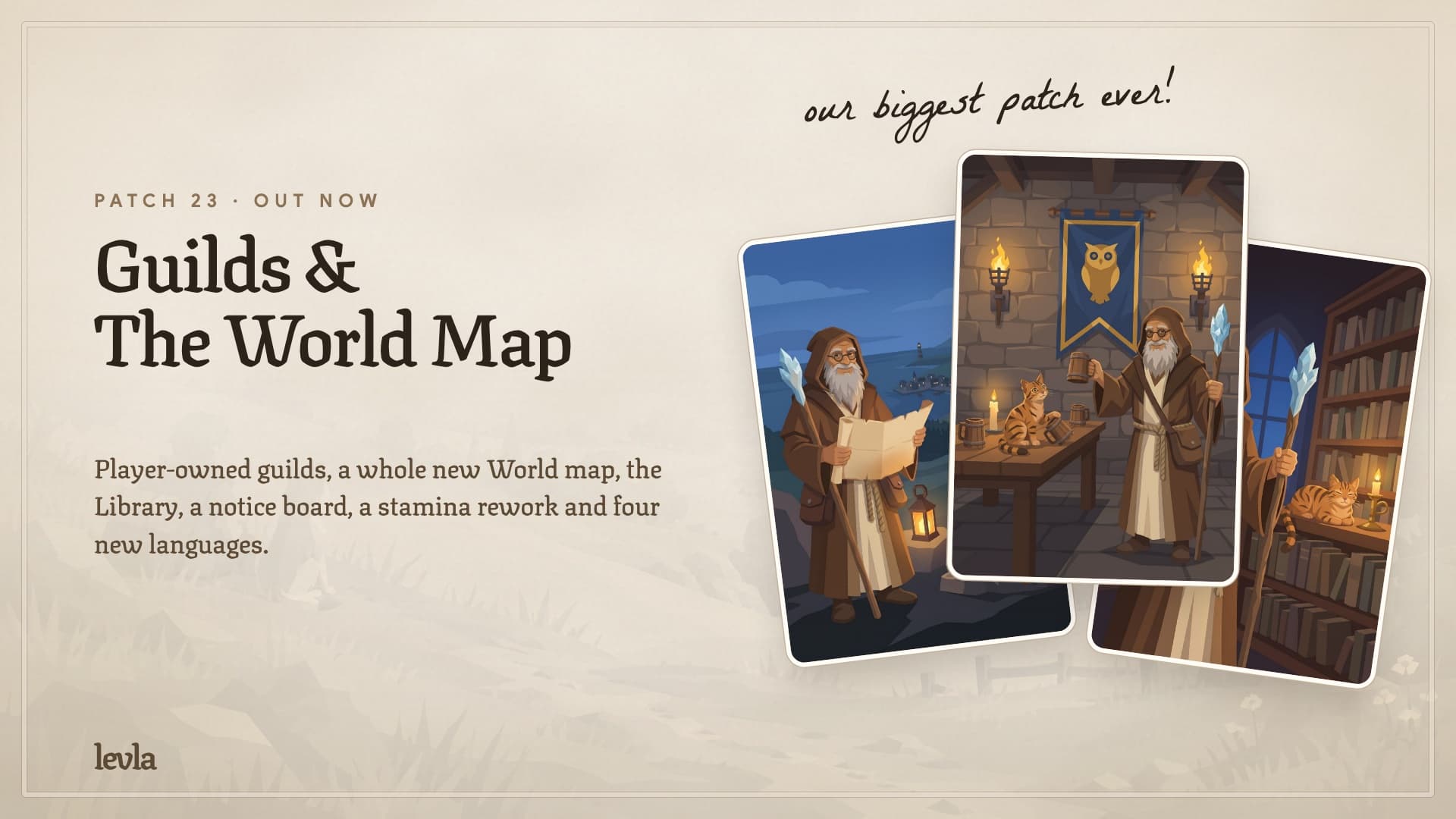
It's finally here! The patch I've been leaking in Discord every single day for over a month is finally ready, i've put blood sweat and tears into this one, it truly is a crazy patch and a huge next step for Levla, and I'm so excited to hear what y'all have to say about it!
This was supposed to be Patch 22.2 - Social Part 2, a small follow-up to the Halloween patch. Then I started building a World map "on the side", the guilds kept growing, and at some point calling it a .2 just felt silly. So say hello to Patch 23, the biggest Levla patch ever, and this time I'm not even adding a "probably"!
Today's patch brings player-owned guilds, a whole new World map, a notice board, the Library, a stamina rework, four new languages and sooo much more.
Just like last time, everything social in here is 100% optional. Here at Levla we'll never force you to do anything you don't want to, so if guilds or the reading room don't sound like your thing, you can ignore them completely and Levla works just like before.
I've worked on this one pretty much every day since the Halloween patch, and it took longer than I said it would (sorry, I'm a perfectionist!). I really hope you enjoy it as much as I've enjoyed building it.
Be prepared though, there's a LOT to go through, so it gets quite yappy. Grab a coffee!
With that said, let's get into what's new in Levla. But first, a quick note!
Pre-note
Update on the app stores!
As usual with full releases, you're going to need to update your app on either the App Store or the Play Store, depending on what platform you're on.
Everything in today's patch needs the new version (1.1.0), so without updating you won't see guilds, the World map or any of the other goodies!
And if you're enjoying Levla, a review on the store is a huge help to our growth. Thank you <3
Why Patch 23?
In the last roadmap this was Patch 22.2, with Patch 23 being the productivity update. It simply outgrew its name, so it took the number 23, and the patches after it move up by one. Nothing has been cut, it's only the numbers that changed!
Two things I said would be in this patch didn't make it though: the Guardian system and the refreshed Homestead. I've moved them to a later patch, so I can give them the time they deserve.
A special thank you
This patch wouldn't have been possible without my team of testers, who have lived in their guilds and on the new map for weeks now, and found an embarrassing amount of bugs before you had to. Thank you so much!
New this time: further down in the bug fixes, you'll see a name next to many of the fixes. Those are the Levlans who reported them in Discord, and they're the reason those bugs got fixed. Keep them coming!
And to all of you using and supporting Levla, both F2P users and members: thank you. Getting picked as one of Google's favorite apps for November still feels unreal to me, and that's all because of you.
Much love! <3
Upcoming Roadmap
A short update on the roadmap, with the new numbers:
Patch 24 - Productivity
- Widgets
- Mood Tracking
- Productivity QOL
- New Web Portal for Habits & Todos
Patch 25 - Major Content Update
- Combat Rework
- Potion Rework
- Magic Combat
- At least 2 new locations, hopefully 3
- 10+ new quests & lore
- Much more crafting in all skills
Other Planned Changes
- Other Community Events
- Guardian System
- Homestead Refresh
- Redesign of the Bounty Board
- Farming Redesign
- New Mynting and Enchantment UI
- Refreshed animations and adventure look.
- OFC Much more cosmetics and cool stuff
Fall is here, and Christmas is coming!
Halloween has packed up for this year. A Murder in Witsend can no longer be started (if you started it in time, you can still finish it!), and the Odd Glowing Pumpkins have stopped dropping. Thank you to everyone who took part, and to the 74 of you who made something for the Harvest Fair!
A walk into autumn
The first time you open Levla after updating, you'll walk home again. This time the Blood Moon sets and the wind turns the road to autumn, and there's a little something from me waiting at the gate! It's there until the end of November.
A Christmas theme (yes, already)
I may have gotten a little too excited: Levla has a brand new Christmas theme in pine green and cranberry red, with snow, and a snowman app icon to go with it! Just like the Halloween theme, it's on by default for all you dark mode users.
Too early for you? Tap the snowflake at the top of your profile menu to open the new Theme picker, where you can switch between Dark, Light, Halloween and Christmas whenever you like.
The app icon can be changed under App Icon in your settings. The Levla crown is back as its own icon there, and the Halloween icon is now open to everyone!
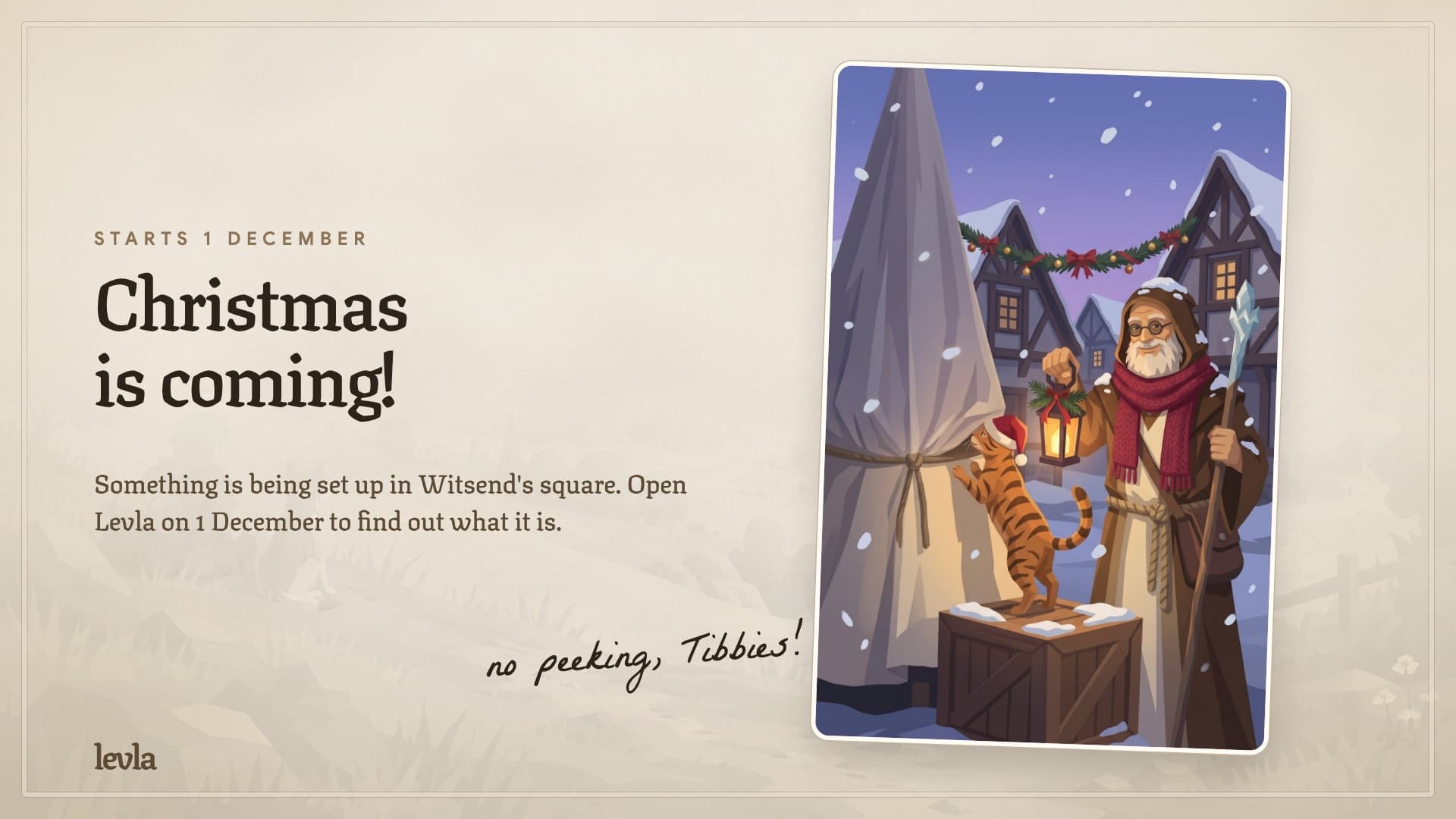
Christmas starts on 1 December
Something is being set up in Witsend's square. I'm not going to tell you what it is, but open Levla on 1 December and you'll find out! There will be a gift from me waiting at the gate that day, and the whole World map turns white.
Expect at least the same quality as the Halloween event. More on it very soon!
The New World Map
Navigating around Levla has been a long-time battle of mine. Ever since the playtest, we've been trying to build a game world without the actual world. You started adventures from one screen, found quests on another, and the World tab was a third way of getting around. It was confusing, and it never really felt like a place.
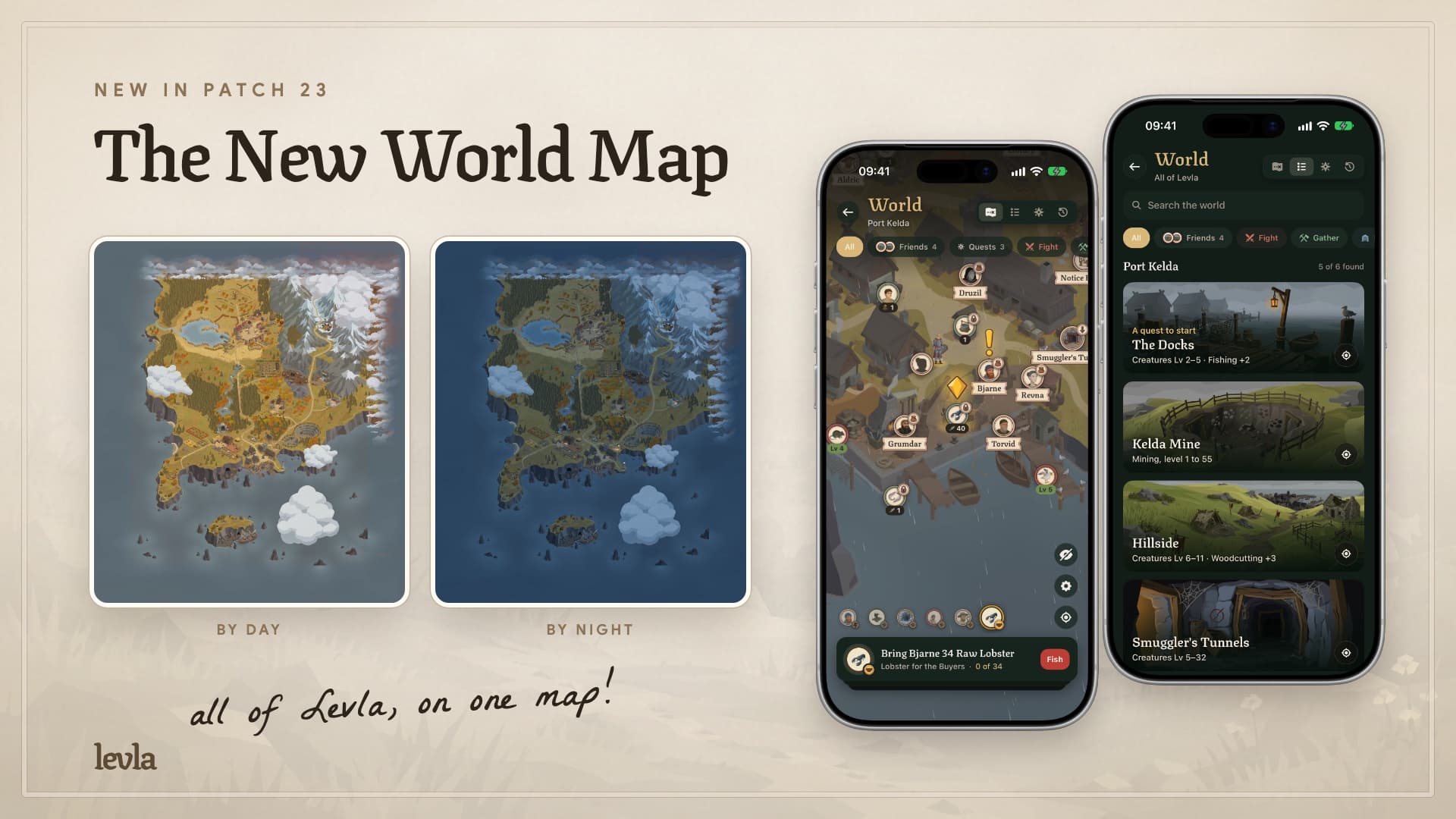
So since the start of October I've been building one. All of Levla is on one painted map now, and fights, gathering, dungeons and quests all start from it!
You won't be walking around on it. Think of it as the world map in any game you've played: it's there for atmosphere, world-building and a much better way of finding your way around Levla.
Note: The map is fully built in 3D and then rendered to 2D. I'm not a 3D artist, I'm still learning this, and it's extremely time consuming, so it's not final or perfect in any way. Please be kind :')
How to open it
Tap the mountain button at the top of the Farm and Adventure tabs, or World map in the side menu. Bob will show you where everything went after you update.
One map, four views
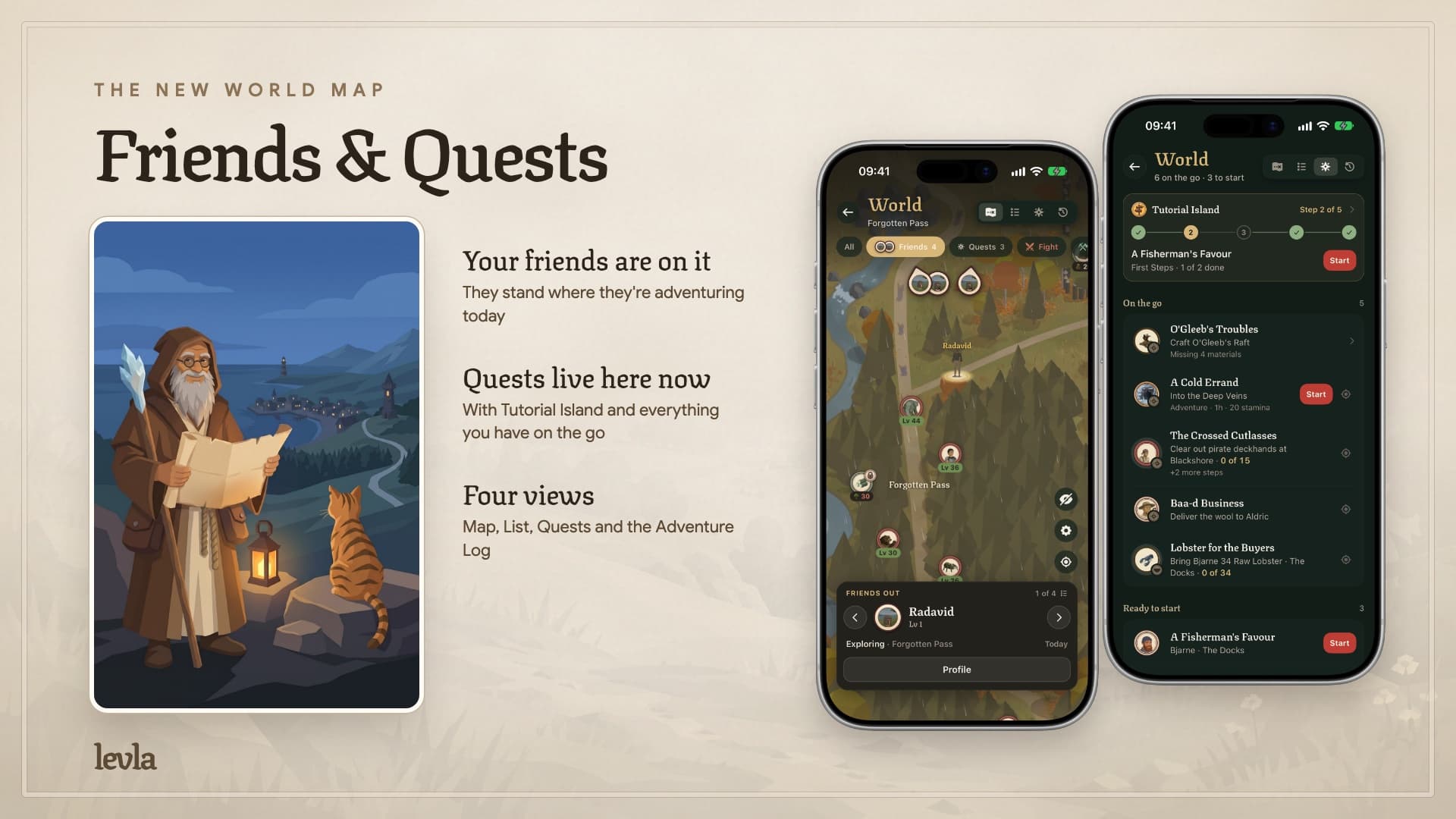
At the top of the map you can switch between four views:
- Map: the world itself
- List: every place as its own painting, with a search bar that finds places, creatures, gathering spots, dungeons and people. You can even search for what a spot gives, like "shrimp"
- Quests: your quests live here now, with the ones ready to hand in on top. Tutorial Island sits at the top until you finish it
- Adventure Log: redrawn from scratch, with one card for each day. Tap a row to see it on the map or do it again
Finding your way around
- Tap a pin to open it. A place's sheet has tabs for its quests, fights, gathering spots, dungeons, folk and more
- Locations or World: in the map's settings (the gear) you choose what the map shows. Locations gives you one pin for each place, and World shows the people, creatures and spots inside them
- Gold marks: a "!" is a quest to start, a tick is a quest to hand in, and a diamond means something you're doing is there. The one you're following lights up
- "?" and padlocks: places you haven't found yet show as a "?", with a hint on how to find them. A padlock means you've found it but can't get in yet, and its sheet tells you how
- The helper: a small deck of cards at the foot of the map keeps track of everything you have on the go, like your quests, your bounty, your citizen request and your running adventure, and points you to where each one happens
- Filters: show only your Favourites, Friends, Quests, Fight, Gather, Dungeons or Train
- Below ground: the Smuggler's Tunnels, The Deep Veins and O'Gleeb's Grotto have maps of their own. Tap Go below or Go inside to visit them!
- Hide pins: tap the eye to hide every pin for a moment and just look at the art
The sheets you open from the map are all new too. A creature's sheet tells you in plain words how the fight will go, like "You can win about 10 in a row". A gathering spot says what you'll get in an hour and shows the odds of every find. And if you're already out on an adventure, you can queue another one right there!
Your friends are on it
Friends who are out adventuring today stand on the map where they are, dressed like they are right now and doing what they're doing: fighting, chopping, mining or fishing.
Tap the Friends filter to visit them one by one. And if you like the look of what they're up to, you can join in right from their card!
If you'd rather not see friends on your map, turn off Show friends in the map's settings. And if you don't want to be seen yourself, players with a private profile never show on anyone's map.
A world that's alive
- Day and night: the map follows your own clock, with night from eight in the evening until six in the morning. Prefer one of them? Set it to always day or always night
- Weather: rain showers and falling leaves through November, and snow from December. Not a fan? Turn off Seasonal effects
- Sound: wind, water and the life of every place you move over. Stop over Witsend's square or the mines and have a listen! Levla's theme plays softly on top, with its own volume slider
- Small secrets: I won't spoil them, but keep an eye on the Wizard's Tower at night...
And those clouds along the edges? There's something under them, but that's for a later patch 👀
Performance mode
The map is the heaviest thing in Levla so far, so it comes with a Performance mode: simpler art up close, no glows or effects, and fewer friends at once. It turns on by itself on older phones, and if the map runs slow on yours, Bob will offer to turn it on. You'll find the switch in the map's settings.
What moved
A new map means a few things have a new home:
- The World tab is now your Farm, and holds your Homestead
- Quests and Tutorial Island moved to the map's Quests view
- The Adventure Hub is gone, since everything it offered is on the map now. Browse and the empty slot in your Adventure Queue open the World map instead
- The Adventure Log is the map's fourth view
I know that's a lot of things moving at once (again, sorry!), but I truly believe Levla is much easier to find your way around now. Let me know in Discord how it feels!
Port Kelda's Notice Board
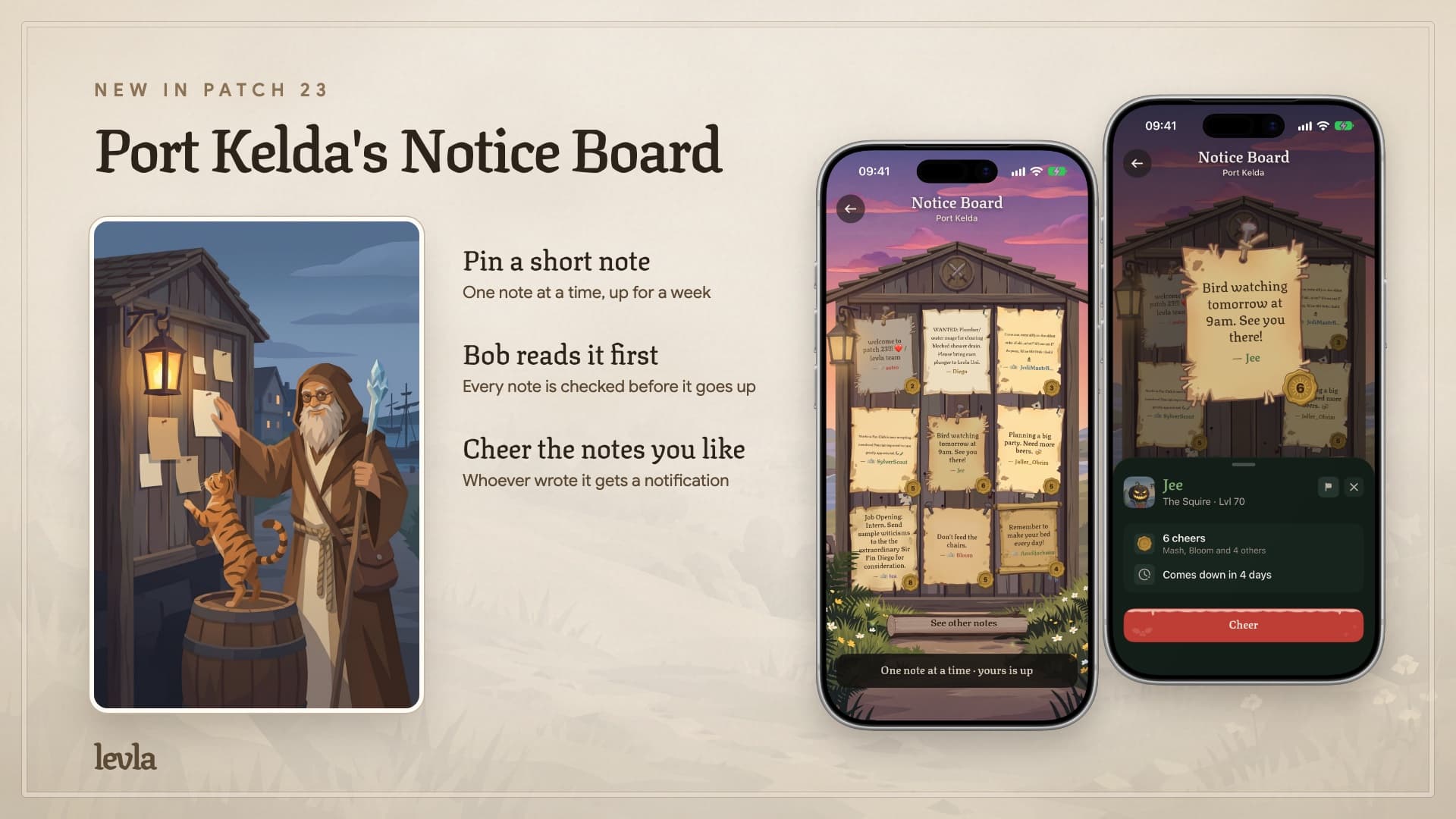
There's a new notice board down by The Docks in Port Kelda, and it's yours! Pin a short note to cheer on everyone who reads it.
- You can have one note up at a time, up to 100 characters
- Bob reads every note before it goes up, and you get a notification when yours is on the board
- A note stays up for a week
- Cheer the notes you like, and whoever wrote it gets a notification
- The board shows nine notes at a time: yours, your friends', the newest ones and a daily mix. Tap the log in front of the board to see the others
- A gold "!" over the board on the map tells you when there's something new on it
- Seen something that shouldn't be there? Report it, and it's hidden for you while Bob takes a look
The board is alive too, with its own day, dusk and night, a swinging lantern and fireflies. If you don't want its notifications, turn off Notice board in your notification settings.
Curiosities
While you're out exploring the map, keep an eye out for curiosities: odd little spots with a story to tell. Open one and its story is told a page at a time, and some of them have a real story behind them too, which you can unroll at the end.
I'm not going to tell you where they are. Go find them!
Player-Owned Guilds
One of the most requested features ever is finally here: your own guilds!
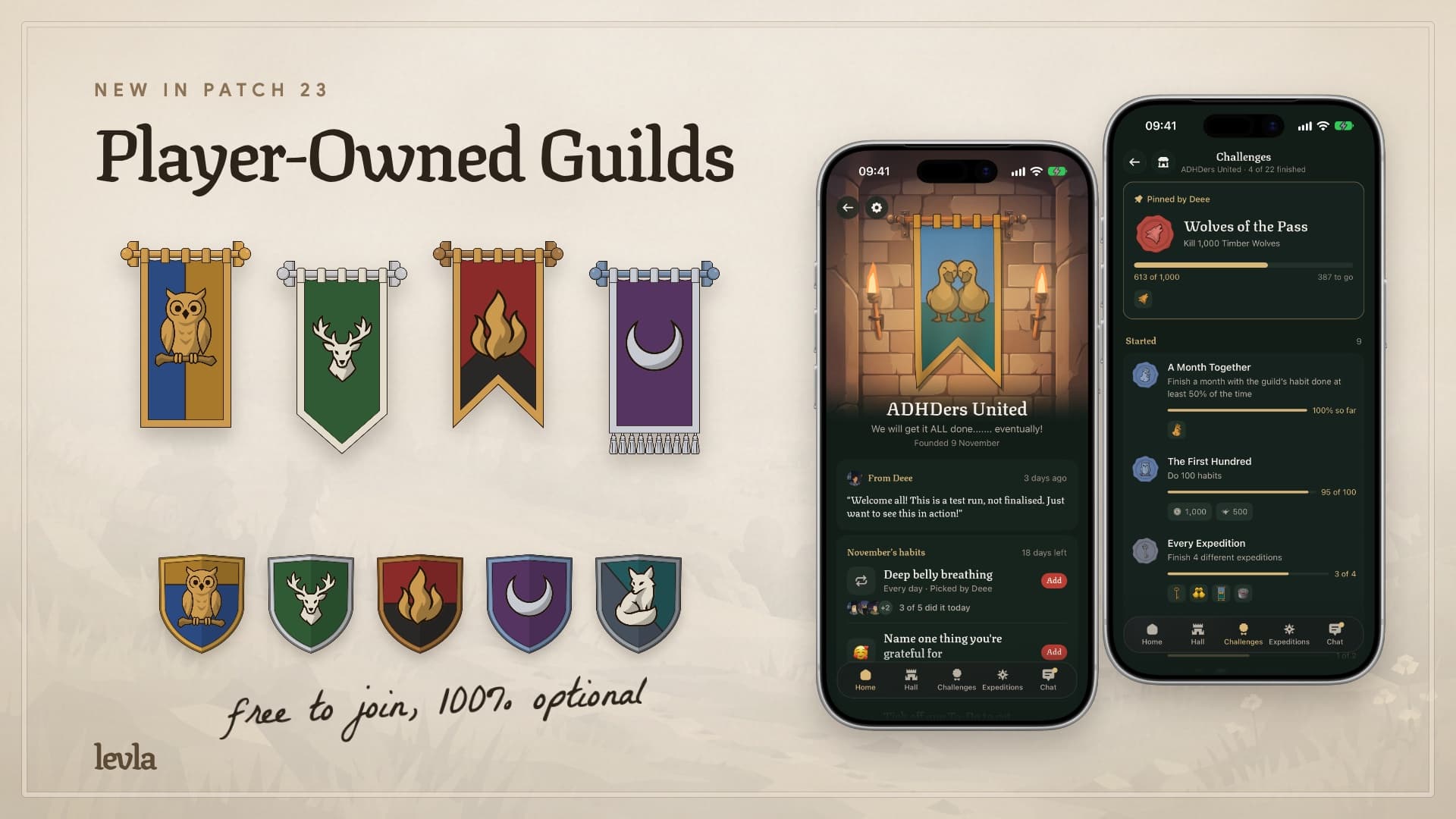
A guild is a group of players who take on the same habits each month, chat with each other, build a guild hall and go on expeditions together. Joining a guild is free for everyone, creating one needs a membership, and you can be in one guild at a time.
Open the Guild tab to get started!
PRE-NOTE
Because of how guilds are structured, at this moment you can only be part of one at a time, now if that is something you all want changed, it is very easy for me to do a follow-up update on and fix, so let me know in discord as usual!
Finding or creating a guild
Find a guild shows the guilds your friends are in first. You can search by name, or pick a topic like Fitness, Sleep or Food.
Each guild chooses who can join:
- Anyone: tap Join and you're in, as long as there's a free seat
- People ask to join: send a request, and the leader or an officer says yes or no. You can ask up to 3 guilds at once
- Invite only: you need an invite or the guild's link
If a guild is full, tap Tell me when a seat is free and you'll get a notification when one opens up.
When you create a guild, you pick its name, motto, what it's about and who can join, and you design its banner: colours, pattern, emblem, shape and rod. A new guild has 30 seats, and you can unlock more.
A guild has one leader and up to 3 officers, who let people in, pick the month's habits and start expeditions. If someone hasn't opened Levla in two weeks, their seat can be freed up for someone new, and if the leader is away for a month, the guild passes to the officer who's been in it the longest. So a guild is never stuck!
Habits of the month
Each month your guild takes on up to three habits, like "Read 10 pages" or "Walk 20 minutes", and you join the ones you want.
- The leader or an officer picks next month's habits from the 20th, and they start on the 1st. They can also put it to a vote
- Tap Add to my habits to join one. Nobody adds it for you! You choose how hard it is for you, when it shows up and your reminder
- Already doing something like it? Tap I already do this and pick your own habit instead. You keep your streak
- Your guild's Home shows how many of you did it today
- When the month is over, the habit stays on your list as your own, with its streak
Guild chat
Yes, I know I said Levla wouldn't get a chat! This one stays inside your guild, where only its members can read it, and it comes with rules: be kind, and no links, emails or phone numbers.
You can reply, react (a heart, a laugh, fire or a crown), mention someone with @ and edit your own messages. Tap the + next to the message box to post a card:
- Anyone need these? List things you have spare
- Looking to trade: say what you want and what you'll give
- Looking for an oath partner: find someone to keep a habit with
- Share a habit: show the guild one of your habits, so others can add it too
- Share a challenge: tell the guild which challenge you're working on
Guildmates can trade or swear an oath with you straight from your card, even if you aren't friends.
Your guild's habits, votes and expeditions show up in the chat as well, so you can join a habit, vote or give supplies right from there. The leader and officers can delete messages, mute someone for an hour, a day or a week, and tag @everyone once an hour.
Chat notifications start on replies and mentions only. You can change that to everything or nothing.
The guild hall
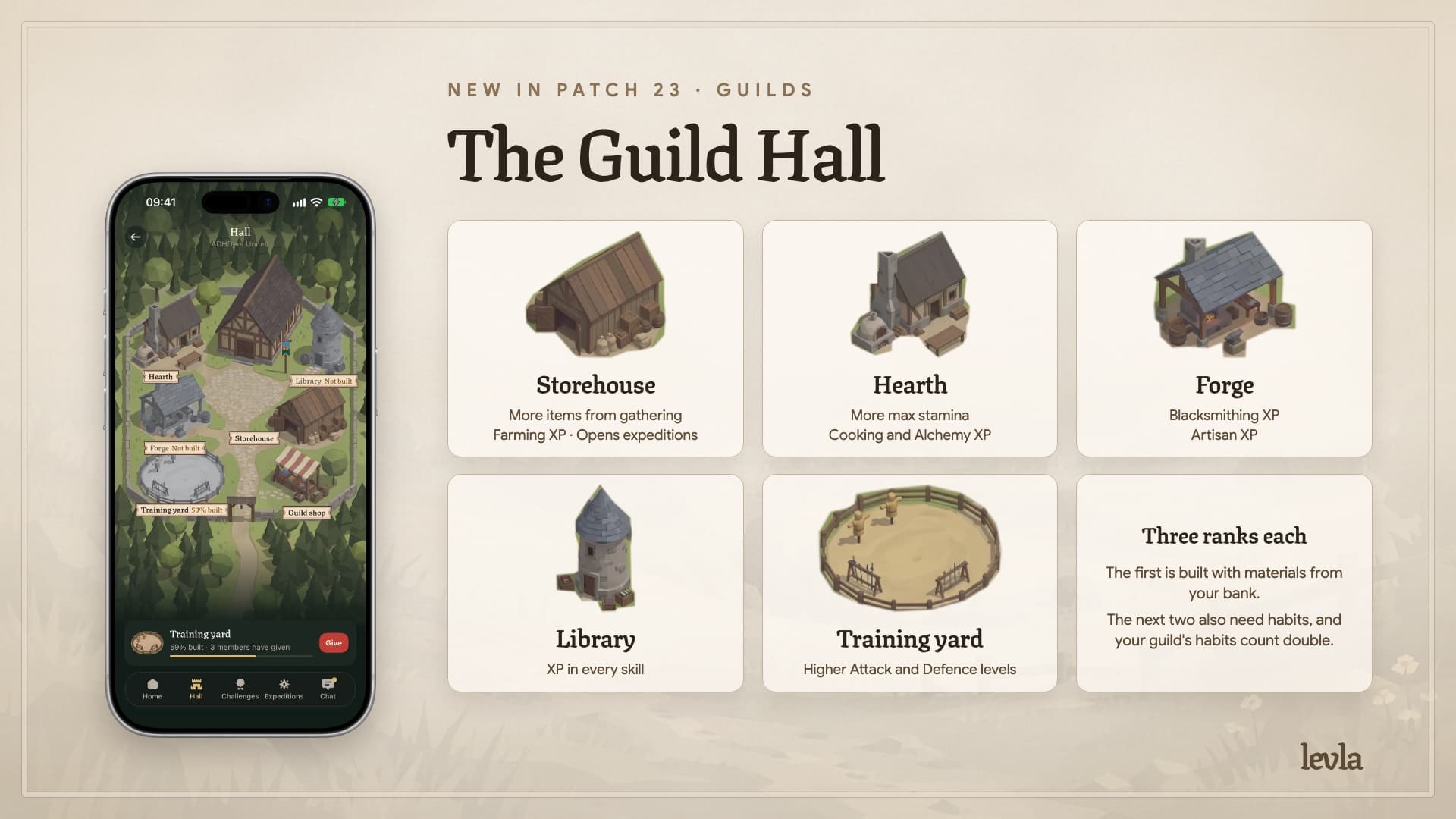
In the Hall tab, your guild builds its hall together, one station at a time. Anyone in the guild can give materials from their bank (you can't take them back!), and every station gives the whole guild a bonus:
- Storehouse: more items from gathering and more Farming XP. It also opens up expeditions, so build this one first!
- Hearth: more max stamina, plus Cooking and Alchemy XP
- Forge: Blacksmithing and Artisan XP
- Library: XP in every skill
- Training yard: higher Attack and Defence levels
Every station has three ranks. The first is built with materials alone. The next two need materials and then habits: every habit you complete adds to it, and your guild's habits count double.
At their top rank, the stations give +5% items from gathering, +150 max stamina, +3% XP in every skill, +8% XP in their own skills and +3 Attack and Defence levels.
Note: Hall bonuses count on the days you complete one of your guild's habits, and the day after. So keep those habits going!
Expeditions
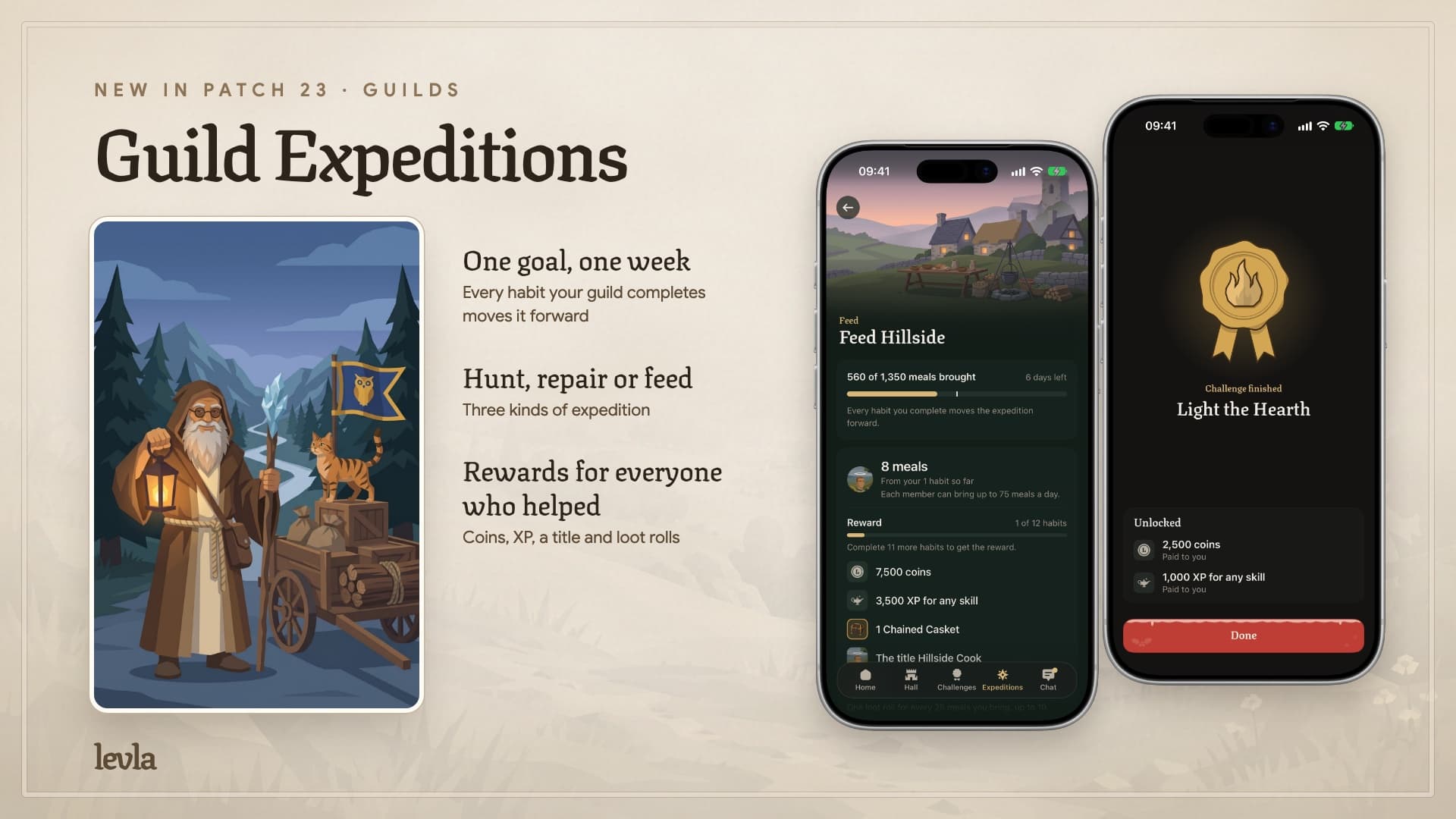
Once the Storehouse is built, your guild can go on expeditions! An expedition is a week where your whole guild works towards one goal, and there are three kinds: hunt a monster, make repairs or bring meals.
- The leader or an officer picks an expedition, and members give its supplies from their bank
- Once the supplies are in, it starts, and for the next 7 days every habit you complete moves it forward. Your guild's habits count twice, and each expedition uses a skill: the higher your level in it, the more your habits add
- The goal depends on how many of you were active in the last week, so a small guild has just as good a chance as a big one
- There's a limit to how much each member can add in a day, so nobody has to carry the whole guild
- If your guild finishes in time, everyone who completed enough habits for it gets the rewards: coins, XP, a title, and loot rolls based on how much you added. The guild also gets a new emblem for its banner
- If time runs out, the supplies are used up and your guild can pick a new expedition
And keep an eye on the expedition's painting. It changes as your guild gets closer!
Challenges & the guild shop
Challenges are goals your guild reaches together, like finishing an expedition or building a station. They all count at the same time, and each one unlocks something: new pieces for your banner, more seats, coins and XP for everyone, or items and recipes in the guild shop.
The guild shop is the market stall on your hall's grounds. You can buy from it once you've completed a guild habit on 14 days since you joined, and you keep what you buy, even if you leave the guild.
Guild habits
The leader and officers can also keep a shelf of habits for the guild. When someone shares a habit in the chat, it can be saved under Guild habits for every member to add.
With a Library station at rank 2, a guild can show its habits to every player, and at rank 3 they're listed in the new Library with the guild's crest. More on the Library further down!
Crests, the map and everything else
- Your guild's crest shows beside your name on your profile and in your friends' lists. Tap Your crest on your profile to pick which one shows, or to hide it
- Guildmates who are out adventuring show on your World map, even if you aren't friends. Turn off Show guildmates in the map's settings if you'd rather not see them
- Your guild has a card at the top of the side menu, with its new messages
- Every kind of guild notification has its own switch under Guilds in your notification settings
- You can report a guild or a message, and nobody in the guild finds out who sent it
What about the Orders?
With guilds in your hands, the Orders (our old guilds) are stepping back. We're a very small team, and I just couldn't keep their content updated alongside everything else.
- The Orders are gone from the Guild tab, their practices no longer show on Home, and habits no longer count towards an Order
- Your Order reputation is not lost! It stays on your profile, and you can still show your Order's crest
- The bonuses you earned from your Order still apply for now. A hall bonus doesn't stack on top of an Order bonus for the same thing, you simply get the bigger one
The Orders themselves will find a new home in the lore of Levla later on.
This is the first version of guilds, and there's much more coming in future updates. I'm super stoked to see the guilds you all create, so let me know how it feels and what you think we should add!
The Library
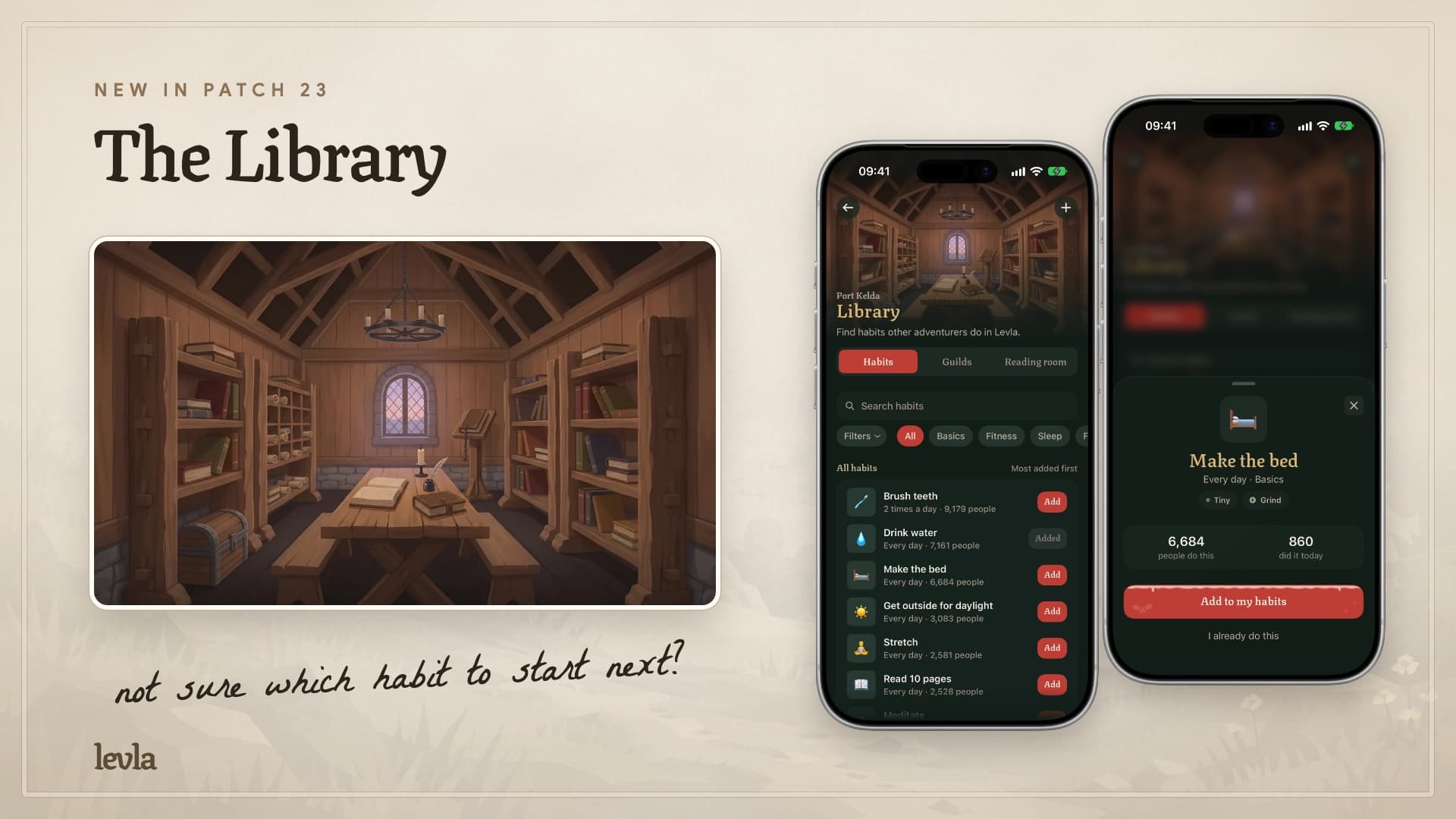
Not sure which habit to start next? The Library is a new place in Port Kelda with ready-made habits you can add in one tap! You'll find it on the World map, in the side menu and where you add a new habit, since it replaces Quick Add.
- Search, or browse by topic: Basics, Fitness, Sleep, Focus, Mindfulness, Food, Home, Learning and Break a habit
- Every habit shows how many players do it
- Filter by the skill a habit trains or by who made it (Levla, players or guilds), or put the newest first
- Tap Add to my habits, or I already do this to count one of your own habits with it
Share your own habits
Got a habit that works for you? Open it and tap Submit to Library in its menu, pick a topic, and add a short description if you like. We check every habit before other players see it, and you choose whether your name shows on it.
Players can thank you for a habit you shared, and your profile shows the habits you've put in the Library, with how many people do each one.
Note: Your habit's own description, reminder and streak are never shared.
The reading room
The reading room is a quiet corner of the Library for a bit of company. Players who join see each other after they complete a habit, and can cheer each other on.
It's completely opt-in, and here's exactly what others see of you: your name and picture, how many habits you've completed today, and your streak (unless you hide it). They never see which habits you do, and you can leave at any time.
This replaces the old "Rallying" system that the old guild system had.
Stamina & Skill Changes
As I mentioned in the community update, stamina works differently from today!
Until now, max stamina came from Agility and the stamina bonus from Restoration, which was really easy to miss. Now both grow with your total level, and the two skills get brand new effects.
Stamina
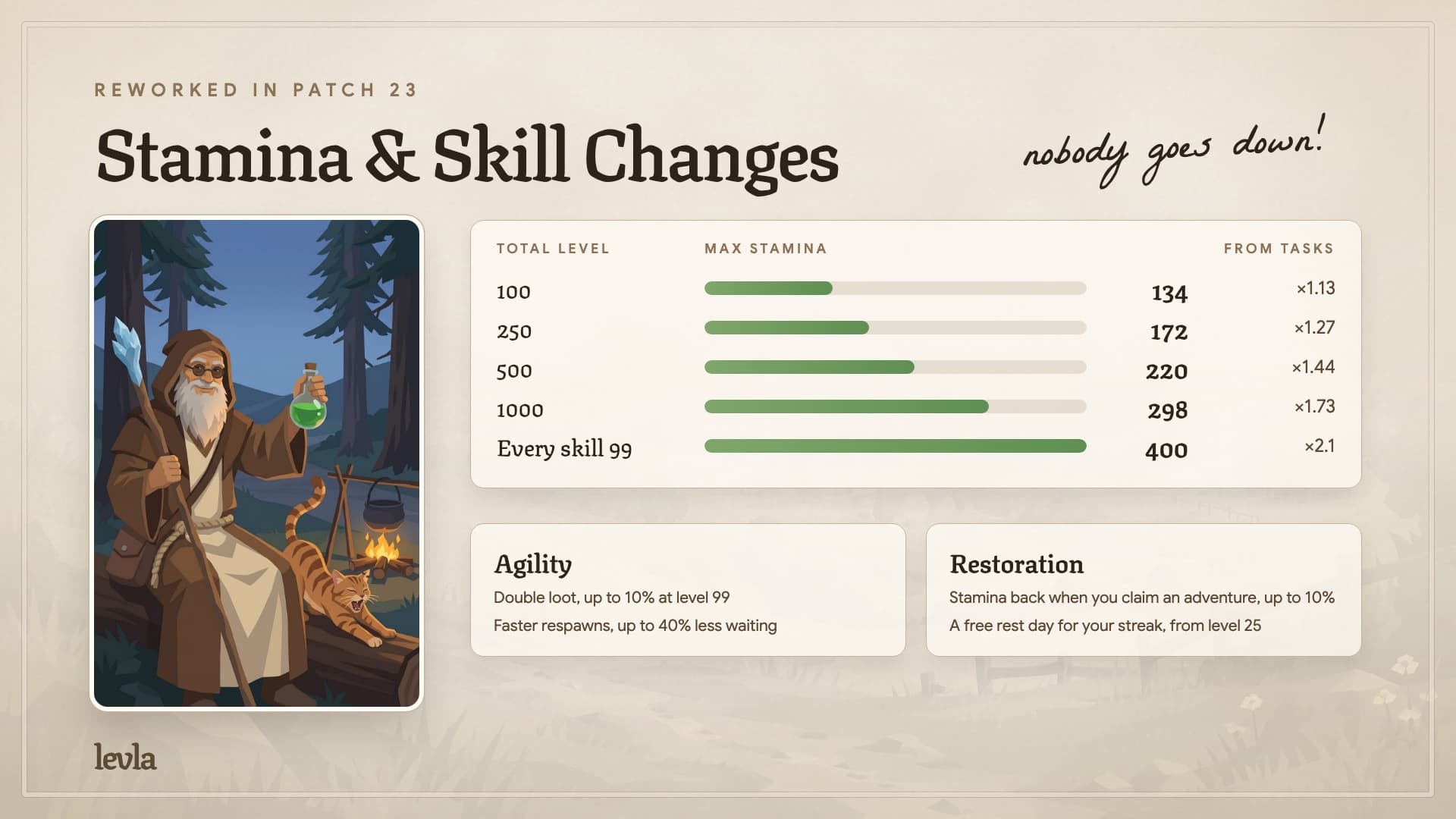
- Max stamina: up to 400 (was 300)
- Stamina from tasks: up to ×2.1 (was ×2)
- Every level in any skill counts, and early levels count the most
- Nobody goes down: if Agility or Restoration gave you more than the new system does, you keep that until your total level catches up
Total level → max stamina · stamina from tasks
- 100 → 134 · ×1.13
- 250 → 172 · ×1.27
- 500 → 220 · ×1.44
- 1000 → 298 · ×1.73
- Every skill 99 → 400 · ×2.1
The old stamina dialog is also gone. In its place there's How stamina works, three pages with pictures that explain what stamina is, what adventures cost and what your levels give.
Agility
- Double loot: a chance for a kill to drop its loot twice, up to 10% at level 99 (5% at 50). It works on every kill in monster slaying and dungeons. Quest items and one-time drops don't double
- Faster respawns: monsters come back sooner while slaying, up to 40% less waiting at 99 (20% at 50)
Restoration
- Stamina refund: when you claim an adventure, you get back part of the stamina it used, up to 10% at 99 (5% at 50). It can take you past your max, and small leftovers carry over to your next claim
- Rest days: from level 25, a free rest day saves your streak when you miss a day. It's used before your streak freezes, so those stay banked. It recharges every 4 weeks (3 at level 50, 2 at 75, every week at 99)
Note: One thing changed since the community update. Crafting doesn't give a stamina refund, only adventures do.
Levla in Four New Languages
Levla now speaks German, French, Spanish and Brazilian Portuguese!
And I don't just mean the buttons. The whole game is translated: quests, characters, items, notifications and even our emails. Levla follows your phone's language, and on the Welcome screen you can pick another one from the flag in the top-left corner.
These are brand new translations of a LOT of text, so if something reads weird in your language, please let me know in Discord!
Other Changes
- NEWLeft-handed layout moves checkboxes, create buttons and Collect to the left side of the screen. Turn it on in Settings, under What you see
- NEWUndo one takes back a single tap on sticky habits and on habits you do several times a day
- NEWYou can log and undo yesterday's habits from Home, until today ends
- NEWYou can give up a bounty from its sheet, and the board tells you when you can't reach its monster
- NEWHome shows an Add a habit row whenever no habits are showing
- NEWYou can trade and swear oaths with your guildmates, and the privacy settings have a new Friends and guildmates option for it
- NEWWhat's New in your profile menu has a new tour of this patch's highlights
- BETTERConversations are now one parchment panel at the foot of the screen, and every reply that does something says what, like starting a quest
- BETTERThe quest, creature and gathering spot sheets have been redrawn, with their painting on top
- BETTERThe serif font is back on a lot more buttons. I know you love it!
- BETTERThe membership screens got a full redesign, and plans now show at once on iPhone
- BETTERLevla uses a lot less memory, especially on Android, which should mean fewer crashes and slowdowns
- BETTERA skill's page now shows each bonus with what it reaches at level 99
- BETTER"How to get it" on an item now shows the shopkeeper's portrait, and says what a character gives you and when
- BETTERA todo planned for one day and due on a later one now reminds you on both days
- BETTERSkill suggestions for a new habit are smarter, and no longer suggest Archery
- BETTERThe Sawmill now says how long sawing takes
- BETTERLocked titles and cosmetics now say who they're for
- BETTERIf a game data update fails to download while you're playing, you carry on with what you have instead of getting stuck on the connection screen
- CHANGEA members quest you started as a member now waits under For members when your membership ends, instead of showing steps you can't do
Bug Fixes
Habits, Todos & Journal
- FIXEDTask of the Day no longer picks a "Stay under" habit, where the bonus could never be earned (Credit: @jaller_obrim)
- FIXEDHabits you can do more than once a day, like "20 times a week", now stay on Home after you tick them, until you reach the week's goal (Credit: @jaller_obrim)
- FIXEDYour todo lists no longer turn into "No List" after a while, especially when you're in a shared list (Credit: @dalish2337, @sylverscout)
- FIXEDReminders for habits set to every few days, counting from when you last did them, now move when you finish the habit early (Credit: @jaller_obrim)
- FIXEDWhen an oath breaks, the notification now says which habit was missed, on which day, and that your streak together starts over (Credit: @sylverscout)
- FIXEDOn Android, the Complete button on habit and todo reminders works again (Credit: @jaller_obrim)
- FIXEDScrolling the list in the "Welcome back!" pop-up no longer scrolls Home behind it (Credit: @ryveigha)
- FIXEDChanging the date of an overdue todo now moves it to the new day, instead of leaving it overdue (Credit: @investorfrog)
- FIXEDA stake with a missed day now has a button to log that day, and says what to do and by when
- FIXEDUndoing a completed todo, step or repeating todo is a lot more reliable, on shared lists and offline too
- FIXEDA repeating todo with steps now finishes when you complete its last step
- FIXEDAnswering "I slipped" in a late check-in now saves, even when the habit was already marked as missed
- FIXEDKeyboard suggestions and autocorrect work again when you name a habit or todo
Adventures, Skills & Bounties
- FIXEDThe Adventure Log and the adventure sheet now say that coins are added as they drop, not when you claim (Credit: @ver05234)
- FIXEDSpells can be cast as soon as their cooldown reaches 0, instead of failing with "1 more second" (Credit: @backsong)
- FIXEDOn smaller phones like the iPhone SE, the Start gathering button on tree spots is no longer cut off (Credit: @bulletsandbracelets)
- FIXEDWhen a queued adventure finishes, the next one now shows as started, instead of the queue looking paused until you tap the screen (Credit: @helen.moody)
- FIXEDYour adventure queue no longer stops when two adventures try to start at the same moment (Credit: @sylverscout)
- FIXEDWhen a queued adventure fails to start, you now always get its stamina back
- FIXEDThe Tutorial Island step "Equip New Gear" now names the two items it needs, and gives them back once if you sold or traded them
- FIXEDQuest steps that end with talking to Brother Omar now have a Talk to button, so you can finish Saving the Garden
- FIXEDSaving the Garden's brewing step now names the Completely Normal Potato, like the item
- FIXEDStarting a quest from Tutorial Island no longer leaves its sheet on top of the conversation
- FIXEDA gathering spot no longer lists the same tool twice
Items, Crafting & Trading Post
- FIXEDAccepting a trade that asks for crafted items, like rings, no longer cancels the trade (Credit: @helen.moody)
- FIXEDThe gold amount at the top of the Vendors and Trading Post screen no longer shows in tiny text (Credit: @honrot)
- FIXEDItems you named with a name tag keep their name when you cancel a Trading Post listing (Credit: @kearney95)
- FIXEDSelling an item from your bank no longer shows a bare price form first. The sell screen loads the buyers, other sellers and prices before you set a price (Credit: @sylverscout)
- FIXEDThe Trading Post listings no longer jump up and down after you scroll down quickly (Credit: @backsong)
- FIXEDOn Android, tapping search in the Bank now opens the keyboard, and the search bar no longer hides behind the buttons at the bottom (Credit: @thaholycheese)
- FIXEDTapping an item's number in the seed, supply, forge and sawmill pickers now puts the cursor after the number, instead of selecting all of it (Credit: @jaller_obrim)
- FIXEDThe Mynt list and gold total no longer include items saved in a loadout, which were never melted anyway
- FIXEDMembers items no longer show a broken "Is Premium" line under Requirements, and their Equip button says "Members only" if you're not a member
- FIXEDGathering tools say again that they work from your bank
Profile & UI
- FIXEDTall hats, Halloween masks and halos are no longer cut off at the top of your character (Credit: @helen.moody)
- FIXEDWomen's characters are no longer zoomed in and cut off in the small pictures on the leaderboard and in oaths (Credit: @helen.moody)
- FIXEDHair no longer shows through hoods and hats in the small pictures of your character (Credit: @dalish2337, @sylverscout)
- FIXEDThe date at the top of Home no longer shrinks to a tiny size (Credit: @a.b.dance)
- FIXEDPage titles no longer have the tops of their letters cut off when your phone uses a smaller text size (Credit: @deltaminimal)
- FIXEDOn Android, swiping the colour and style rows on the Customize page no longer opens the side menu (Credit: @cosmicrusalka)
- FIXEDOn small screens, like a Galaxy Z Flip's outside screen, task and habit details no longer run off the top (Credit: @cleverlettuce)
- FIXEDEye colours now show as the colour you picked, instead of looking almost black
- FIXEDOn some Android phones, like Sony Xperia, the screen after "Let's begin" no longer stays empty
- FIXEDSigning in with Google from the Log in screen works on iPhone and iPad again
- FIXEDDeleting your account works with the code from any email we sent, not just the newest one
- FIXEDBuying Lifetime while a free trial or yearly plan is still renewing now tells you to cancel that plan, so you don't pay twice
- FIXEDChoosing your name now says plainly when you're offline, and lets you carry on if the check can't run
- FIXEDOn iPhone, Home no longer goes blank after you switch between Tasks and World while scrolled down
- FIXEDSheets follow the keyboard again after another sheet has been open over them
- FIXEDAndroid app icons show the whole crown, instead of a zoomed-in middle
That's it!
That's it for Patch 23! If you made it all the way down here, you're a legend.
As always, I'll be hanging around in Discord every day this week, so come tell me what you think, what broke and what you want next!
Thank you for supporting us cousins on this journey. Have a cosy, productive November, and I'll see you in Witsend's square on 1 December!
Much love, Mod Ed & Mod Back <3
